> For the complete documentation index, see [llms.txt](https://testbox.ortusbooks.com/llms.txt). Markdown versions of documentation pages are available by appending `.md` to page URLs; this page is available as [Markdown](https://testbox.ortusbooks.com/browser-testing/attachments.md).

# Attachments

Attach screenshots, traces, videos and any other file to a spec, and find them in every report.

A failing browser test is much easier to fix when you can see the page. TestBox lets any spec **attach files** to its result: screenshots, Playwright traces, videos, logs, HAR files or anything else. Reporters list the attachments under the spec, and the JUnit reports expose them to Jenkins and GitLab.

[Browser specs](/browser-testing/browser-testing.md#turning-on-browser-support) attach the screenshots, trace and videos of a failed `browse()` call for you, and you can call `attach()` from any spec, on any engine.

## `attach()`

```java
attach( required string path, string type = "file", string name = "" )
```

| Argument | Default       | Description                                                                                                        |
| -------- | ------------- | ------------------------------------------------------------------------------------------------------------------ |
| `path`   |               | The absolute path of the file.                                                                                     |
| `type`   | `file`        | The kind of file, for example `file`, `screenshot`, `trace`, `video` or `log`. Reporters show it next to the name. |
| `name`   | the file name | The display name. Defaults to the file name of `path`.                                                             |

`attach()` returns the spec, so calls chain. Attachments are kept for **passed and failed** specs alike.

{% tabs %}
{% tab title="BoxLang" %}
{% code title="tests/specs/ReportSpec.bx" %}

```java
class extends="testbox.system.BaseSpec" {

    function run() {
        describe( "Monthly report", () => {

            afterEach( () => {
                // Keep the application log of every spec
                attach( expandPath( "/logs/app.log" ), "log" )
            } )

            it( "renders the PDF", () => {
                var pdf = getTempDirectory() & "report.pdf"
                new models.Reports().monthly( pdf )

                attach( path = pdf, type = "file", name = "Monthly report" )
                expect( fileExists( pdf ) ).toBeTrue()
            } )

        } )
    }

}
```

{% endcode %}
{% endtab %}

{% tab title="CFML" %}
{% code title="tests/specs/ReportSpec.cfc" %}

```cfscript
component extends="testbox.system.BaseSpec" {

    function run(){
        describe( "Monthly report", function(){

            afterEach( function(){
                // Keep the application log of every spec
                attach( expandPath( "/logs/app.log" ), "log" );
            } );

            it( "renders the PDF", function(){
                var pdf = getTempDirectory() & "report.pdf";
                new models.Reports().monthly( pdf );

                attach( path = pdf, type = "file", name = "Monthly report" );
                expect( fileExists( pdf ) ).toBeTrue();
            } );

        } );
    }

}
```

{% endcode %}
{% endtab %}
{% endtabs %}

In xUnit bundles, call `attach()` from the test method, `setup()` or `teardown()`.

{% hint style="warning" %}
`attach()` only works while a spec runs, on the thread running it: from a spec body, `beforeEach()`, `afterEach()` or `aroundEach()` (or `setup()`, a test method and `teardown()` in xUnit). Anywhere else, such as `beforeAll()` or a thread you spawned, it throws `TestBox.InvalidContext`.
{% endhint %}

TestBox records the path you give it; it does not copy the file. Keep attached files where your CI job can collect them, and do not delete them in `afterAll()` if you want to look at them later.

## Automatic Browser Artifacts

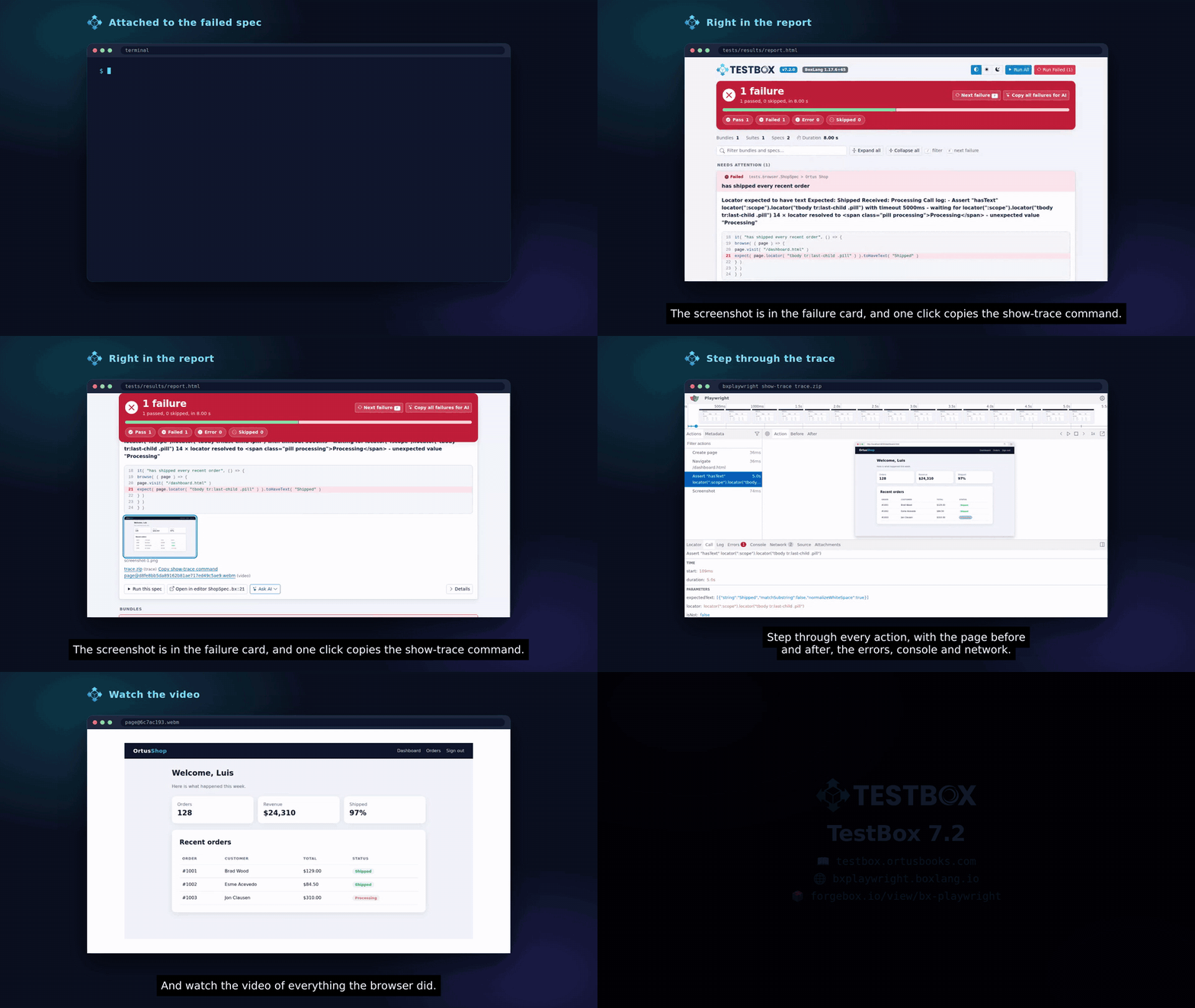
<figure><img src="https://2482745662-files.gitbook.io/~/files/v0/b/gitbook-x-prod.appspot.com/o/spaces%2F5kuiG5ZXNT2hNA83299A%2Fuploads%2Fgit-blob-cc692d96ffea42c33f3428bb8907159a6f552b5d%2Ftestbox-failure-artifacts.gif?alt=media" alt="A failed browser spec with its screenshot in the HTML report and its Playwright trace"><figcaption><p>The screenshot, trace and video of a failed browser spec</p></figcaption></figure>

{% hint style="info" %}
Automatic browser artifacts require BoxLang and bx-playwright, like every [browser spec](/browser-testing/browser-testing.md) feature. Browser specs are BoxLang classes, and on BoxLang without bx-playwright they skip before any artifact is recorded.
{% endhint %}

bx-playwright records screenshots, traces and videos according to its **artifact policies**. They are all `off` by default. Turn them on with a profile, for example the built-in `ci` profile, or with the `artifacts` setting or `browse()` option:

| Policy                                  | Keeps                                          |
| --------------------------------------- | ---------------------------------------------- |
| `off`                                   | nothing                                        |
| `on`                                    | always                                         |
| `only-on-failure` / `retain-on-failure` | only when the browser context closes as failed |

The `ci` profile keeps a screenshot (`only-on-failure`), a trace and videos (`retain-on-failure`) of every failed context:

```java
@browserProfile( "ci" )
class extends="testbox.system.BaseSpec" {
    // ...
}
```

Or per `browse()` call:

```java
browse(
    ( page ) => {
        page.visit( "/checkout" ).click( "Pay now" )
        expect( page ).toSee( "Thank you" )
    },
    {
        artifacts : {
            screenshot : "only-on-failure",
            trace      : "retain-on-failure",
            directory  : expandPath( "/tests/results/artifacts" )
        }
    }
)
```

When the `browse()` closure throws, whether from a matcher, a bx-playwright assertion or any other error, TestBox closes each browser context as failed, attaches what the policies kept to the running spec, then rethrows the original exception:

| Kept file                   | Attachment type |
| --------------------------- | --------------- |
| Screenshot of each page     | `screenshot`    |
| Playwright trace (a `.zip`) | `trace`         |
| Video of each page          | `video`         |

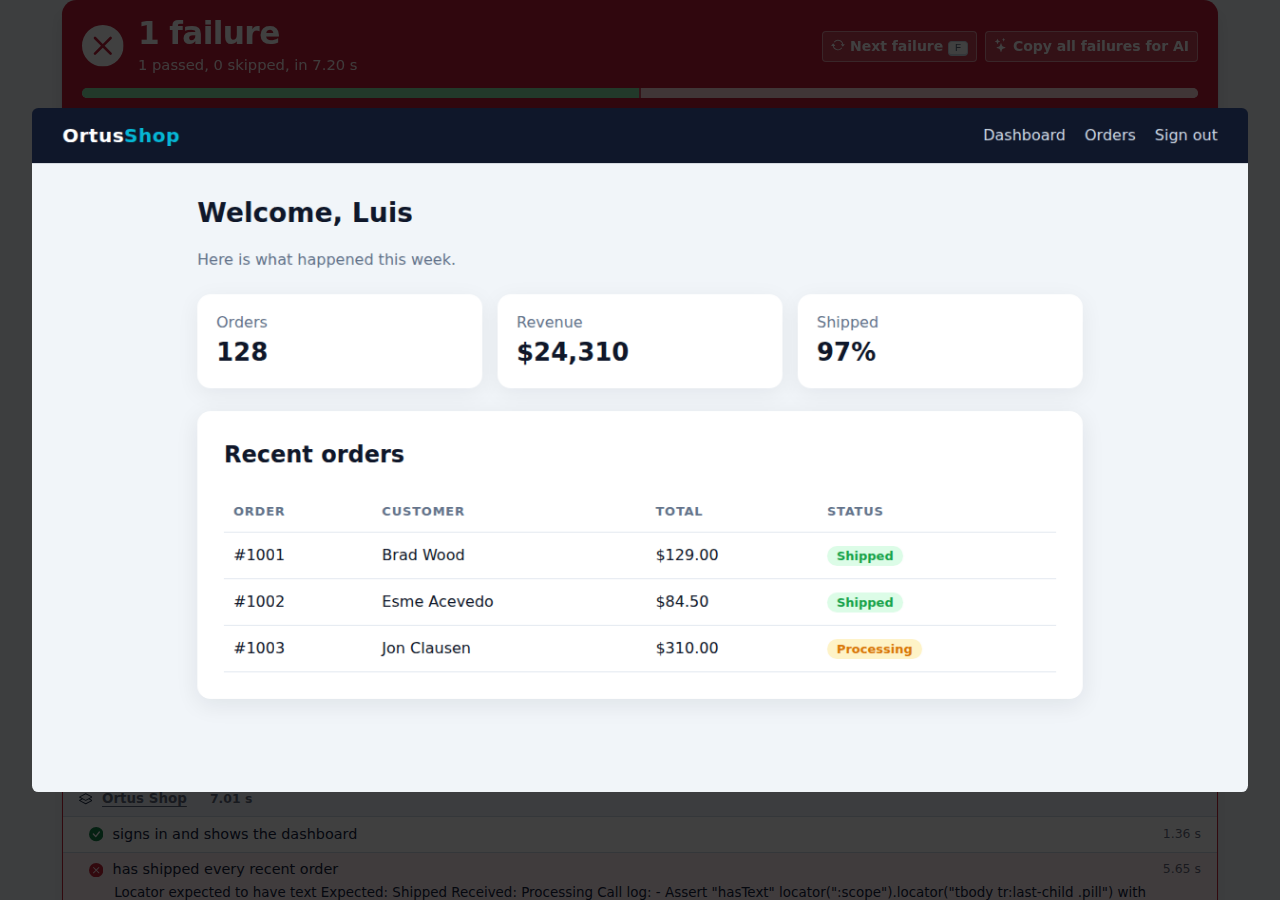
This is the screenshot TestBox attached when the spec expected the last order to be `Shipped` but the page showed `Processing`:

<figure><img src="https://2482745662-files.gitbook.io/~/files/v0/b/gitbook-x-prod.appspot.com/o/spaces%2F5kuiG5ZXNT2hNA83299A%2Fuploads%2Fgit-blob-796379a095bbac7394b62bac0b1ebcf50bc1230f%2Fbrowser-testing-failure-screenshot.png?alt=media" alt="Failure screenshot of the dashboard with the last order still Processing"><figcaption><p>The failure screenshot: the last order is still Processing</p></figcaption></figure>

Files go to `~/.boxlang/playwright/artifacts` unless you set `artifacts.directory`. When the closure passes, nothing is kept or attached for the `on-failure` policies. More on policies in the [bx-playwright testing guide](https://bxplaywright.boxlang.io/testing/).

### Opening a Trace

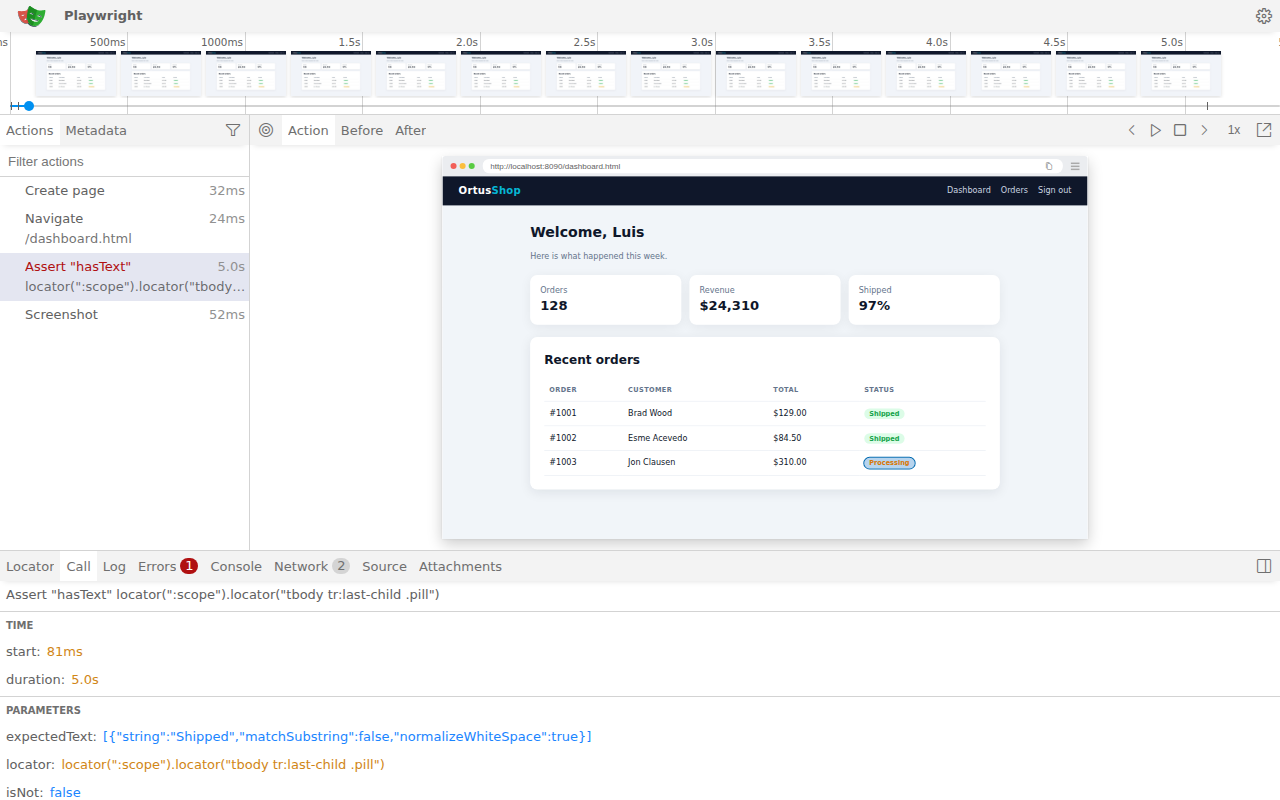
A trace records every action, a DOM snapshot before and after it, the console and the network. Open one in the Playwright trace viewer:

```bash
bxplaywright show-trace tests/results/artifacts/trace.zip
```

Select an action to see the page at that moment, the call parameters and the error. Here the `hasText` assertion waited 5 seconds for `Shipped` and the trace shows the `Processing` pill it found instead:

<figure><img src="https://2482745662-files.gitbook.io/~/files/v0/b/gitbook-x-prod.appspot.com/o/spaces%2F5kuiG5ZXNT2hNA83299A%2Fuploads%2Fgit-blob-0be6c18ba48e8621bd4522425770dccce493932e%2Fbrowser-testing-trace-viewer.png?alt=media" alt="The Playwright trace viewer showing the failed hasText assertion"><figcaption><p>The failed assertion in the Playwright trace viewer</p></figcaption></figure>

## Attachments in Reports

| Reporter or output                                                          | Shows                                                                                                                                                          |
| --------------------------------------------------------------------------- | -------------------------------------------------------------------------------------------------------------------------------------------------------------- |
| JSON (`json`) and Raw                                                       | An `attachments` array of `{ path, type, name }` in every spec's stats, passed or failed.                                                                      |
| Simple (`simple`), Min (`min`), Dot (`dot`) and Doc (`doc`)                 | Screenshots as thumbnails that open full size, and a list of the other files, each name linking to its file. A trace has a **Copy show-trace command** button. |
| JUnit (`junit`) and ANT JUnit (`antjunit`)                                  | A `<system-out>` element on the test case with one `[[ATTACHMENT\|path]]` line per file.                                                                       |
| Text (`text`), Console (`console`) and the BoxLang runner `--stream` output | The attachments of **failed and errored** specs, listed under the failure with their name, type and path.                                                      |

### Screenshots in the HTML Reports

The HTML reporters embed image attachments (`png`, `jpg`, `gif` and `webp`) in the page, so the screenshot of a failure shows right on the failed spec. Click a thumbnail to see it full size, then click anywhere or press Escape to close it.

<figure><img src="https://2482745662-files.gitbook.io/~/files/v0/b/gitbook-x-prod.appspot.com/o/spaces%2F5kuiG5ZXNT2hNA83299A%2Fuploads%2Fgit-blob-9d0f1a426ac119bbfb1b082cd174781fcafd6573%2Fbrowser-testing-report-inline-screenshot.png?alt=media" alt="A failed browser spec in the Simple report with its screenshot as a thumbnail, and its trace and video listed below"><figcaption><p>The failure screenshot on the failed spec</p></figcaption></figure>

<figure><img src="https://2482745662-files.gitbook.io/~/files/v0/b/gitbook-x-prod.appspot.com/o/spaces%2F5kuiG5ZXNT2hNA83299A%2Fuploads%2Fgit-blob-eaab71980d999fe366e673481707cd9858db630a%2Fbrowser-testing-report-screenshot-zoom.png?alt=media" alt="The failure screenshot open full size over the report"><figcaption><p>A click opens it full size</p></figcaption></figure>

Embedding means the screenshots work wherever the report goes: served by a web runner, saved as a file, or uploaded as a CI artifact. A failed spec's screenshots are embedded once, in its failure card, and the bundle list links to that card.

Images up to 2 MB are embedded. Larger ones stay links. Change the limit with the `inlineImageMaxKB` reporter option, or set it to `0` to link every image:

{% tabs %}
{% tab title="BoxLang" %}

```java
new testbox.system.TestBox(
    bundles  = "tests.specs",
    reporter = { type : "simple", options : { inlineImageMaxKB : 512 } }
).run()
```

{% endtab %}

{% tab title="CFML" %}

```cfscript
new testbox.system.TestBox(
    bundles  = "tests.specs",
    reporter = { type : "simple", options : { inlineImageMaxKB : 512 } }
).run();
```

{% endtab %}
{% endtabs %}

Videos, traces and other files are listed under the spec. A trace has a **Copy show-trace command** button that copies the `bxplaywright show-trace` command for its path.

The JUnit output follows the convention of the Jenkins [JUnit Attachments plugin](https://plugins.jenkins.io/junit-attachments/), which GitLab also reads for its test reports:

```xml
<testcase name="pays with a card" classname="tests.specs.CheckoutSpec" time="3.2">
    <failure message="Locator expected to be visible ...">...</failure>
    <system-out>[[ATTACHMENT|/builds/app/tests/results/artifacts/checkout-1.png]]
[[ATTACHMENT|/builds/app/tests/results/artifacts/trace.zip]]</system-out>
</testcase>
```

* **Jenkins:** install the JUnit Attachments plugin and publish the JUnit report. Attachments appear on each test result page.
* **GitLab:** publish the report as `artifacts:reports:junit` and keep the attached files in the job artifacts. GitLab shows screenshots on the failed test in the merge request test report. It resolves the paths inside the job artifacts, so write artifacts under the project directory, for example with `artifacts.directory`.

When you consume results programmatically, read the attachments from the spec stats:

{% tabs %}
{% tab title="BoxLang" %}

```java
var results = new testbox.system.TestBox( bundles = "tests.specs.CheckoutSpec" ).runRaw()
var spec    = results.getBundleStats()[ 1 ].suiteStats[ 1 ].specStats[ 1 ]

for ( var attachment in spec.attachments ) {
    println( "#attachment.name# (#attachment.type#): #attachment.path#" )
}
```

{% endtab %}

{% tab title="CFML" %}

```cfscript
var results = new testbox.system.TestBox( bundles = "tests.specs.CheckoutSpec" ).runRaw();
var spec    = results.getBundleStats()[ 1 ].suiteStats[ 1 ].specStats[ 1 ];

for ( var attachment in spec.attachments ) {
    writeOutput( "#attachment.name# (#attachment.type#): #attachment.path#<br>" );
}
```

{% endtab %}
{% endtabs %}

See [Reporters](/digging-deeper/reporters.md) for how to choose a reporter.


---

# Agent Instructions
This documentation is published with GitBook. GitBook is the documentation platform designed so that both humans and AI agents can read, navigate, and reason over technical content effectively. Learn more at gitbook.com.

## Querying This Documentation
If you need additional information that is not directly available in this page, you can query the documentation by asking a question.

Perform an HTTP GET request on the following URL with the `ask` and `goal` query parameters:

```
GET https://testbox.ortusbooks.com/browser-testing/attachments.md?ask=<question>&goal=<user_goal>
```

`ask` is the immediate question: it should be specific, self-contained, and written in natural language.
`goal` is what the user is ultimately trying to achieve, the reason they need the answer. Sharing it helps GitBook give you a better, more relevant answer. A goal is most helpful when it describes the outcome the user wants rather than restating the question. For example, with `ask=how do I create an API token`, a goal like `automate deployments from our CI pipeline` lets GitBook tailor the answer to that use case.

The response will contain a direct answer to the question and relevant excerpts and sources from the documentation.

Use this mechanism when the answer is not explicitly present in the current page, you need clarification or additional context, or you want to retrieve related documentation sections.