> For the complete documentation index, see [llms.txt](https://testbox.ortusbooks.com/llms.txt). Markdown versions of documentation pages are available by appending `.md` to page URLs; this page is available as [Markdown](https://testbox.ortusbooks.com/browser-testing/browser-testing.md).
# Overview
Drive a real browser from your TestBox specs with bx-playwright.
TestBox can drive a real browser (Chromium, Firefox or WebKit) from your specs through the [bx-playwright](https://bxplaywright.boxlang.io) module. Your specs visit pages, click, fill forms and assert on what a user actually sees, with the same `describe()`, `it()` and `expect()` you already write.
{% file src="/files/LNjLkDmtdGb7POERERVb" %}
Browser testing in TestBox 7.2, in 80 seconds
{% endfile %}
{% hint style="info" %}
Browser specs and the [browser matchers](/browser-testing/browser-matchers.md) require BoxLang, because bx-playwright only runs on BoxLang. Write browser specs as BoxLang classes (`.bx`) and keep them in a folder that your CFML engine runs exclude: on Lucee or Adobe the browser annotations do nothing, so `browse()` is not defined and calling it errors. On BoxLang without bx-playwright, `browse()` and `this.playwright()` skip the running spec with an install hint, so the rest of your suite still runs:
* `bx-playwright is not installed: install-bx-module bx-playwright`
The features that browser tests rely on, [attachments](/browser-testing/attachments.md), [retries](/browser-testing/retries.md), `Playwright.AssertionFailed` counted as a failure and the [`--failed` runner option](/browser-testing/running-browser-tests.md#rerun-what-failed-failed), work for every spec on every engine.
{% endhint %}
## Why Browser Tests?
Unit and integration specs call your code directly. A browser test exercises the whole stack the way a user does: routing, templates, JavaScript, CSS and the network all take part. bx-playwright brings two things that make those tests reliable:
* **A real browser.** Pages render and run their JavaScript exactly as they do for your users, headless in CI or headed while you debug.
* **Web-first assertions.** Every assertion retries until it passes or its timeout expires (5 seconds by default), so you never sprinkle `sleep()` calls to wait for an element or a redirect.
TestBox adds the testing glue on top: one browser per bundle, fresh isolated pages per spec, `expect()` [matchers](/browser-testing/browser-matchers.md) for pages and locators, failure screenshots, traces and videos [attached to the spec](/browser-testing/attachments.md), [retries](/browser-testing/retries.md) for flaky specs, and runner options to [start your web server and rerun only what failed](/browser-testing/running-browser-tests.md).
A browser spec signing in and checking the dashboard
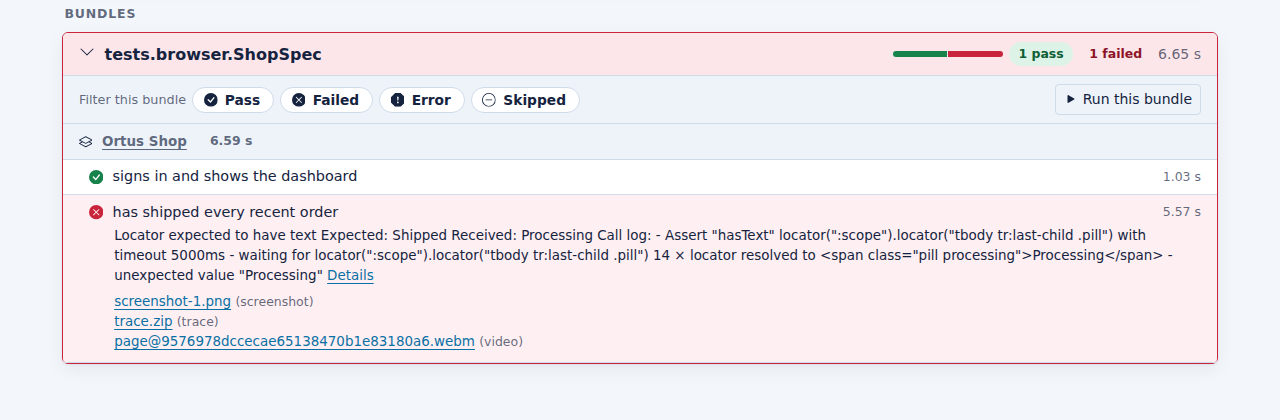
And when a spec fails, you get the evidence on the failing spec in your report:
Screenshot, trace and video attached to a failing spec
## Installation
bx-playwright needs BoxLang 1.17+ and Java 21+. TestBox needs a bx-playwright version that provides `playwrightEnsureBrowser()`, the first stable bx-playwright release or later. Install the module into your BoxLang runtime:
```bash
install-bx-module bx-playwright
```
That is all you need locally: the first time a bundle opens a browser, TestBox installs the browser of its profile through `playwrightEnsureBrowser()`. The first run needs network access and is slower while the browser downloads. On Linux, the system libraries the browser needs are not part of that download: install them once with `bxplaywright install chromium --with-deps` (or your profile's browser).
For CI or offline machines, install the browser up front and turn the download off with `@browserAutoInstall( false )`, or call `ensureBrowserInstalled()` yourself, for example from `beforeAll()`:
```bash
bxplaywright install chromium --with-deps
bxplaywright doctor
```
More browsers, profiles and settings are covered in the [bx-playwright getting started guide](https://bxplaywright.boxlang.io/getting-started/).
## Your First Browser Spec
Add a browser annotation, such as `@browser`, `@browserProfile` or `@baseURL`, on the lines above `class`, and extend `testbox.system.BaseSpec` as usual. TestBox then [turns on browser support](#turning-on-browser-support) for the bundle. Inside a spec, call `browse()` with a closure: it receives a fresh page, and everything the page offers (`visit()`, `click()`, `fill()`, finders, locators and assertions) is the [bx-playwright browsing API](https://bxplaywright.boxlang.io/browsing/).
{% tabs %}
{% tab title="BDD - BoxLang" %}
{% code title="tests/specs/LoginSpec.bx" %}
```java
@baseURL( "http://localhost:8080" )
@browserProfile( "ci" )
class extends="testbox.system.BaseSpec" {
function run() {
describe( "Login", () => {
it( "signs in with valid credentials", () => {
browse( ( page ) => {
page.visit( "/login" )
.fill( "Email", "luis@ortus.com" )
.fill( "Password", "secret" )
.click( "Sign in" )
expect( page ).toHavePath( "/dashboard" )
expect( page ).toSee( "Welcome back" )
} )
} )
it( "rejects a wrong password", () => {
browse( ( page ) => {
page.visit( "/login" )
.fill( "Email", "luis@ortus.com" )
.fill( "Password", "nope" )
.click( "Sign in" )
expect( page ).toHavePath( "/login" )
expect( page.locator( "@error" ) ).toHaveText( "Invalid credentials" )
} )
} )
} )
}
}
```
{% endcode %}
{% endtab %}
{% tab title="xUnit - BoxLang" %}
{% code title="tests/specs/LoginTest.bx" %}
```groovy
@baseURL( "http://localhost:8080" )
@browserProfile( "ci" )
class extends="testbox.system.BaseSpec" {
function testSignsInWithValidCredentials() {
browse( ( page ) => {
page.visit( "/login" )
.fill( "Email", "luis@ortus.com" )
.fill( "Password", "secret" )
.click( "Sign in" )
expect( page ).toHavePath( "/dashboard" )
expect( page ).toSee( "Welcome back" )
} )
}
function testRejectsAWrongPassword() {
browse( ( page ) => {
page.visit( "/login" )
.fill( "Email", "luis@ortus.com" )
.fill( "Password", "nope" )
.click( "Sign in" )
// the bx-playwright inline assertions work too
.assertPathIs( "/login" )
.assertSee( "Invalid credentials" )
} )
}
}
```
{% endcode %}
{% endtab %}
{% endtabs %}
Run it like any other bundle, for example with the [BoxLang CLI runner](/getting-started/running-tests/boxlang-cli-runner.md):
```bash
./testbox/run --bundles=tests.specs.LoginSpec
```
You can assert in two styles, and mix them freely:
* TestBox [browser matchers](/browser-testing/browser-matchers.md): `expect( page ).toSee( "Welcome" )`, `expect( locator ).toBeVisible()`, with `not` forms.
* bx-playwright [assertions](https://bxplaywright.boxlang.io/assertions/): `page.assertSee( "Welcome" )`, `page.expect( "h1" ).toHaveText( "Hi" )`. Their `Playwright.AssertionFailed` exceptions count as spec **failures**, not errors.
## Turning On Browser Support
Browser support is turned on by class annotations, not by a base class. Any spec whose class, or a class it extends, has one of these annotations gets it:
| Annotation | Description |
| ------------------------------------- | ------------------------------------------------------------------------------ |
| `@browser` | Turns browser support on with the bx-playwright default profile. |
| `@browserProfile( "ci" )` | Turns it on with the given bx-playwright profiles, a list such as `ci,mobile`. |
| `@baseURL( "http://localhost:8080" )` | Turns it on with the URL relative visits resolve against. |
`@browserAutoInstall( false )` requires a pre-installed browser instead of downloading one on first use. It does not turn browser support on by itself.
```java
@browser
class extends="testbox.system.BaseSpec" {
function run() {
it( "shows the home page", () => {
browse( ( page ) => page.visit( "http://localhost:8080/" ).assertSee( "Welcome" ) )
} )
}
}
```
When a bundle has browser support, the TestBox runner creates a `testbox.system.browser.BrowserSupport` for it and mixes these methods into the spec's `this` and `variables` scopes, so you call them unqualified:
* `browse( callback, options )`: run a closure with fresh, isolated browser pages.
* `browserAvailable()`: can browser specs run here? See [Skipping When No Browser Is Available](#skipping-when-no-browser-is-available).
* `ensureBrowserInstalled()`: install the profile browser, for example from `beforeAll()` when auto-install is off.
* `getBrowserSupport()`: the bundle `BrowserSupport`.
* `closeBrowser()`: close the bundle browser.
It also adds `this.playwright()`, the bundle manager (described below), and registers the [browser matchers](/browser-testing/browser-matchers.md) for every spec of the bundle. A public method your spec declares itself, with one of these names, is kept, not overridden.
{% hint style="warning" %}
Only **public** methods are kept. A private method with one of these names is replaced by the browser method, so make an override public.
{% endhint %}
* **Inherited.** The annotations are read from the spec class and every class it extends. Put `@browser` on your project base spec and every spec that extends it can browse. A spec can opt out with `@browser( false )`, even when its base spec turns it on.
* **Any base class.** It works for BDD and xUnit bundles, whatever they extend: `testbox.system.BaseSpec`, a ColdBox `BaseTestCase` or your own base spec.
* **BoxLang only.** The runner attaches browser support on BoxLang, where bx-playwright runs. On Lucee and Adobe the annotations are ignored, so keep browser specs out of CFML runs.
```java
// tests/resources/BaseBrowserSpec.bx: every spec that extends it gets browser support.
// It is abstract, so TestBox does not run it as a bundle.
@browserProfile( "ci" )
abstract class extends="testbox.system.BaseSpec" {
}
```
### `BrowserSpec`
`testbox.system.BrowserSpec` is an optional base class: it is a `testbox.system.BaseSpec` that carries the `@browser` annotation and declares no methods of its own. The runner mixes in the browser methods and closes the browser after the bundle. Specs that extend it keep working unless they call `super.browse()` or `super.closeBrowser()`, or override `closeBrowser()` expecting it to run after the bundle.
```java
@baseURL( "http://localhost:8080" )
class extends="testbox.system.BrowserSpec" {
// ...
}
```
## How Browser Support Works
* **One browser per bundle.** The bundle starts one bx-playwright manager, and its browser, the first time a spec uses it. The runner closes it after the bundle, even when your `afterAll()` throws, so your own `beforeAll()` and `afterAll()` need no `super` calls. If a request aborts before the bundle ends, the browser stays open until the next test run that opens a browser, which closes it first. bx-playwright also closes anything left open when the module unloads or the JVM stops.
* **Fresh pages per `browse()`.** Every `browse()` call gets new pages, each in its own browser context (its own cookies, storage and session), and closes them when the closure ends. Specs never leak state into each other.
* **Matchers registered for you.** The [browser matchers](/browser-testing/browser-matchers.md) are registered for every spec of the bundle.
* **Failure artifacts attached.** When the closure throws, the screenshots, trace and videos your artifact policy kept are [attached to the spec](/browser-testing/attachments.md#automatic-browser-artifacts) and the exception is rethrown unchanged.
## Bundle Annotations
| Annotation | Description |
| -------------------- | --------------------------------------------------------------------------------------------------------------------------------------------------------- |
| `browser` | Turns browser support on. Not needed when `baseURL` or `browserProfile` is set. |
| `baseURL` | The URL relative visits such as `page.visit( "/login" )` resolve against. |
| `browserProfile` | The bx-playwright [profiles](https://bxplaywright.boxlang.io/profiles/) for the bundle browser, a list such as `ci,mobile`. Profiles merge left to right. |
| `browserAutoInstall` | Set to `false` to require a pre-installed browser instead of downloading one on first use. |
| `retries` | Rerun failing specs of the bundle. See [Retries](/browser-testing/retries.md). |
When `baseURL` is not set, the bundle uses, in order:
1. The `--web-server-url` of the BoxLang runner, when the runner [started your web server](/browser-testing/running-browser-tests.md#start-a-web-server-for-the-run) (kept in `server.testbox.webServerURL`).
2. The bx-playwright `baseURL` setting, or the `BX_PLAYWRIGHT_BASEURL` environment variable.
When `browserProfile` is not set, bx-playwright uses its `defaultProfile` setting, or the profile named in the `BX_PLAYWRIGHT_PROFILE` environment variable. That makes `BX_PLAYWRIGHT_PROFILE=ci` a handy switch for CI runs, while `browserProfile` pins a profile for one bundle.
```java
// A mobile, dark mode bundle against staging
@baseURL( "https://staging.example.com" )
@browserProfile( "mobile,dark" )
class extends="testbox.system.BaseSpec" {
// ...
}
```
## `browse()`
```java
any function browse( required function callback, struct options = {} )
```
| Argument | Description |
| ---------- | ------------------------------------------------------------------------------------------------------------------------------------------------------------------------------ |
| `callback` | The closure to run. It receives one page per declared argument. |
| `options` | Context options for bx-playwright `newContext()`, for example `{ viewport : { width : 390, height : 844 } }`, `{ timeouts : { assertion : 10000 } }` or an `artifacts` policy. |
`browse()` returns whatever the callback returns, so you can pull a value out of the page and assert on it afterwards:
```java
var title = browse( ( page ) => page.visit( "/" ).title() )
expect( title ).toInclude( "Home" )
```
### One page per argument: multi-user flows
Declare one argument per user. Each argument gets its own page in its **own browser context**, so two users can be signed in at once without sharing cookies:
```java
it( "shows a new message to the other user", () => {
browse( ( alice, bob ) => {
alice.visit( "/login" ).fill( "Email", "alice@example.com" ).fill( "Password", "secret" ).click( "Sign in" )
bob.visit( "/login" ).fill( "Email", "bob@example.com" ).fill( "Password", "secret" ).click( "Sign in" )
alice.visit( "/chat" ).fill( "Message", "Hi Bob" ).click( "Send" )
// Web-first: waits until the message shows up for Bob
expect( bob.visit( "/chat" ) ).toSee( "Hi Bob" )
} )
} )
```
A callback that declares no arguments receives a single page as its first positional argument.
### Context options
The `options` struct applies to every page of the call. For example, a phone sized viewport and a longer assertion timeout:
```java
browse(
( page ) => {
page.visit( "/" )
expect( page.locator( "@mobile-menu" ) ).toBeVisible()
},
{ viewport : { width : 390, height : 844 }, timeouts : { assertion : 10000 } }
)
```
See the bx-playwright [configuration reference](https://bxplaywright.boxlang.io/configuration/) for every option.
## `this.playwright()`
`this.playwright()` returns the bundle's bx-playwright manager, created on first use with the `browserProfile` and `baseURL` annotations. Use it for anything beyond `browse()`, such as the API request client, saved sessions or a page you manage yourself. Everything it starts closes after the bundle.
```java
it( "lists the products from the API", () => {
var response = this.playwright().request().get( "/api/products" )
expect( response.status() ).toBe( 200 )
} )
```
{% hint style="warning" %}
Call it as `this.playwright()`. An unqualified `playwright()` resolves to the bx-playwright built-in function, even inside a browser spec, and returns a **new** manager that ignores the bundle annotations and that the bundle does not close for you.
{% endhint %}
## Skipping When No Browser Is Available
On BoxLang, `browse()` and `this.playwright()` already skip the running spec when bx-playwright is missing. To skip whole suites up front, without even entering them, use `browserAvailable()` in a `skip` constraint:
```java
function run() {
describe( title = "Checkout", skip = !browserAvailable(), body = () => {
it( "pays with a card", () => {
browse( ( page ) => {
// ...
} )
} )
} )
}
```
## Using the Browser From Any Spec
Browser support delegates to `testbox.system.browser.BrowserSupport`, which any BoxLang code can use directly, without the annotations. Close it yourself when you are done:
```java
class extends="testbox.system.BaseSpec" {
function beforeAll() {
variables.browser = new testbox.system.browser.BrowserSupport( this )
addMatchers( new testbox.system.browser.BrowserMatchers() )
}
function afterAll() {
variables.browser.close()
}
function run() {
describe( "Home page", () => {
it( "greets visitors", () => {
variables.browser.browse( ( page ) => {
page.visit( "http://localhost:8080/" )
expect( page ).toSee( "Welcome" )
} )
} )
} )
}
}
```
## Thread Safety
A bx-playwright manager is not thread safe, and a bundle shares one. Do not use `asyncAll` on suites, or bundles, that browse. Run browser bundles sequentially.
## Learn More
{% content-ref url="/pages/Hi7XZ1KYbHbyuawURD00" %}
[Browser Matchers](/browser-testing/browser-matchers.md)
{% endcontent-ref %}
{% content-ref url="/pages/UrJ22dwzQUp9LDxhTvBX" %}
[Attachments](/browser-testing/attachments.md)
{% endcontent-ref %}
{% content-ref url="/pages/hrl8rdfTwRlHqg7HVo50" %}
[Retries](/browser-testing/retries.md)
{% endcontent-ref %}
{% content-ref url="/pages/yeL2CyiNJmkqxeNcL0TX" %}
[Running Browser Tests](/browser-testing/running-browser-tests.md)
{% endcontent-ref %}
The browser API itself is documented in the bx-playwright guides: [Browsing](https://bxplaywright.boxlang.io/browsing/), [Assertions](https://bxplaywright.boxlang.io/assertions/), [Testing](https://bxplaywright.boxlang.io/testing/) (artifacts, debugging, page objects) and [Building on bx-playwright](https://bxplaywright.boxlang.io/integrations/).
---
# Agent Instructions
This documentation is published with GitBook. GitBook is the documentation platform designed so that both humans and AI agents can read, navigate, and reason over technical content effectively. Learn more at gitbook.com.
## Querying This Documentation
If you need additional information that is not directly available in this page, you can query the documentation by asking a question.
Perform an HTTP GET request on the following URL with the `ask` and `goal` query parameters:
```
GET https://testbox.ortusbooks.com/browser-testing/browser-testing.md?ask=&goal=
```
`ask` is the immediate question: it should be specific, self-contained, and written in natural language.
`goal` is what the user is ultimately trying to achieve, the reason they need the answer. Sharing it helps GitBook give you a better, more relevant answer. A goal is most helpful when it describes the outcome the user wants rather than restating the question. For example, with `ask=how do I create an API token`, a goal like `automate deployments from our CI pipeline` lets GitBook tailor the answer to that use case.
The response will contain a direct answer to the question and relevant excerpts and sources from the documentation.
Use this mechanism when the answer is not explicitly present in the current page, you need clarification or additional context, or you want to retrieve related documentation sections.