> For the complete documentation index, see [llms.txt](https://testbox.ortusbooks.com/llms.txt). Markdown versions of documentation pages are available by appending `.md` to page URLs; this page is available as [Markdown](https://testbox.ortusbooks.com/browser-testing/running-browser-tests.md).
# Running Browser Tests
Start your web server for the run, rerun only what failed, and run browser tests in CI.
Browser specs are regular TestBox bundles, so every [runner](/getting-started/running-tests.md) can run them. The [BoxLang CLI runner](/getting-started/running-tests/boxlang-cli-runner.md) adds options that make browser test runs smooth: it can start your application before the tests and stop it afterwards, rerun only what failed last time, and retry flaky specs.
```bash
./testbox/run --directory=tests.browser \
--web-server="boxlang-miniserver --port 8080" \
--retries=1
```
## BoxLang Runner Options
| Option | Default | Description |
| ---------------------- | ----------------------- | --------------------------------------------------------------------------------------------------- |
| `--web-server` | | A shell command that starts a web server before the tests run. |
| `--web-server-url` | `http://localhost:8080` | The URL polled until the server answers. Also the default `baseURL` of browser bundles. |
| `--web-server-timeout` | `60` | How long to wait for the server to answer, in seconds. |
| `--retries` | `0` | How many extra times to run a failing or erroring spec. See [Retries](/browser-testing/retries.md). |
| `--failed` | `false` | Run only the bundles and specs that failed or errored in the last run. |
`--retries` and `--failed` work for any bundle, `.bx` or `.cfc`, browser test or not.
## Start a Web Server for the Run
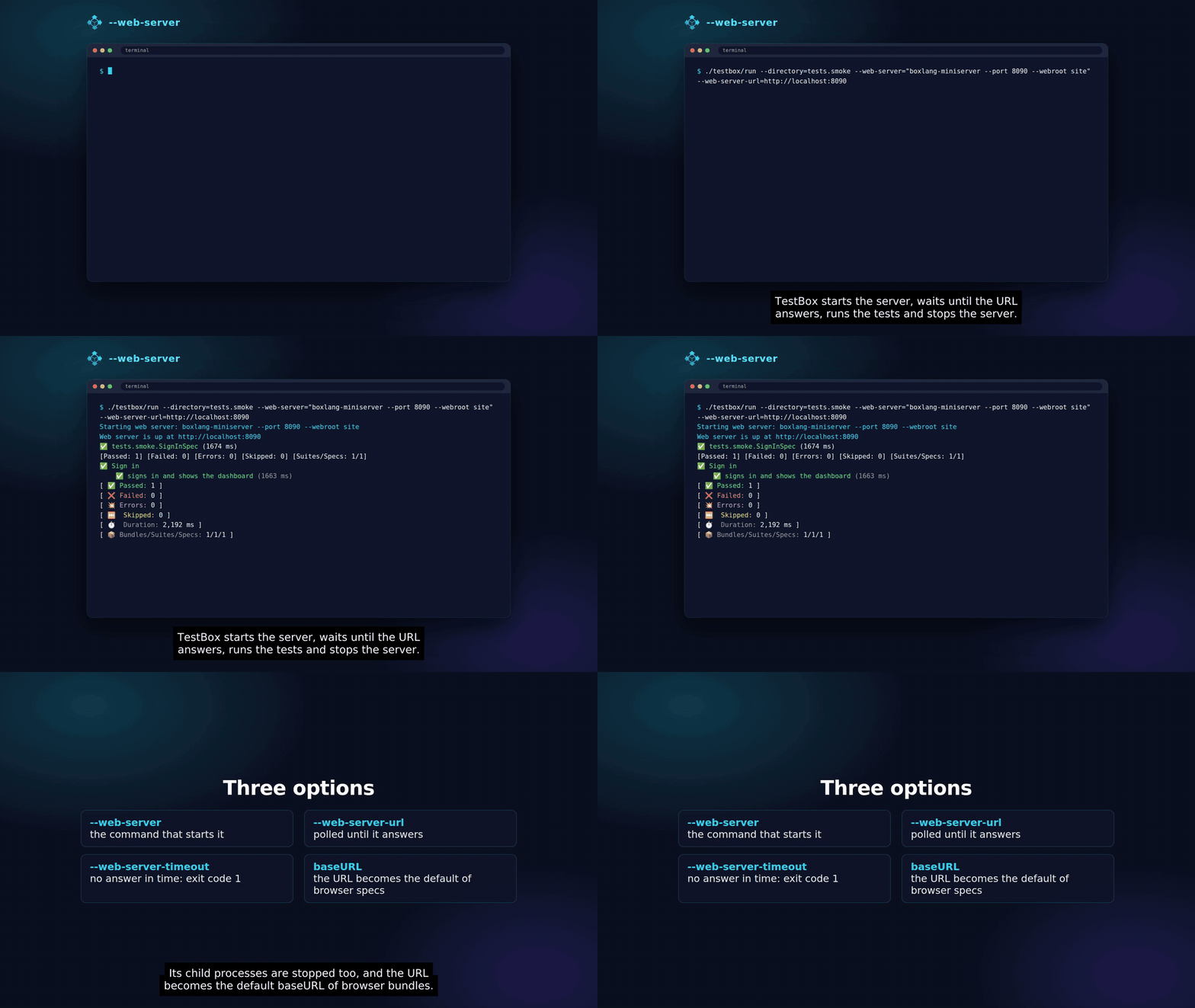
The BoxLang runner starting and stopping your web server
Browser tests need your application running. With `--web-server`, the runner starts it for you:
1. It runs the command with `sh -c` (`cmd /c` on Windows) from the directory you run the tests from.
2. It polls `--web-server-url` until the server answers with an HTTP status below 500.
3. It stores the URL in `server.testbox.webServerURL`, which every [browser bundle](/browser-testing/browser-testing.md#bundle-annotations) without a `baseURL` annotation uses as its base URL, so `page.visit( "/login" )` just works.
4. It runs the tests.
5. It stops the server **and its child processes** after the tests, whether they passed, failed or threw.
```bash
# BoxLang MiniServer on the default port
./testbox/run --web-server="boxlang-miniserver --port 8080"
# Any other server, on another port
./testbox/run --web-server="box server start port=8500 --console" --web-server-url=http://localhost:8500 --web-server-timeout=120
```
If the server does not answer within `--web-server-timeout` seconds, or its command exits first, the runner stops it, prints the reason with the command and the last lines it printed, and **exits with code 1** without running the tests.
{% hint style="warning" %}
**Quoting the command.** Always quote a `--web-server` command that contains spaces. Some BoxLang launchers split quoted arguments at their spaces before the runner sees them, so the runner rebuilds the command: every word after `--web-server=` belongs to the command until the next TestBox runner option (such as `--directory` or `--retries`). A command whose own flags share the name of a runner option, for example a server that takes `--directory`, would be cut short there: put it in a script and pass the script instead.
```bash
# bin/start-server.sh holds: my-server --directory ./www --port 8080
./testbox/run --web-server="./bin/start-server.sh"
```
{% endhint %}
Prefer to start the server yourself? Skip `--web-server` and set the `baseURL` annotation on your bundles, or the `BX_PLAYWRIGHT_BASEURL` environment variable.
## Rerun What Failed: `--failed`
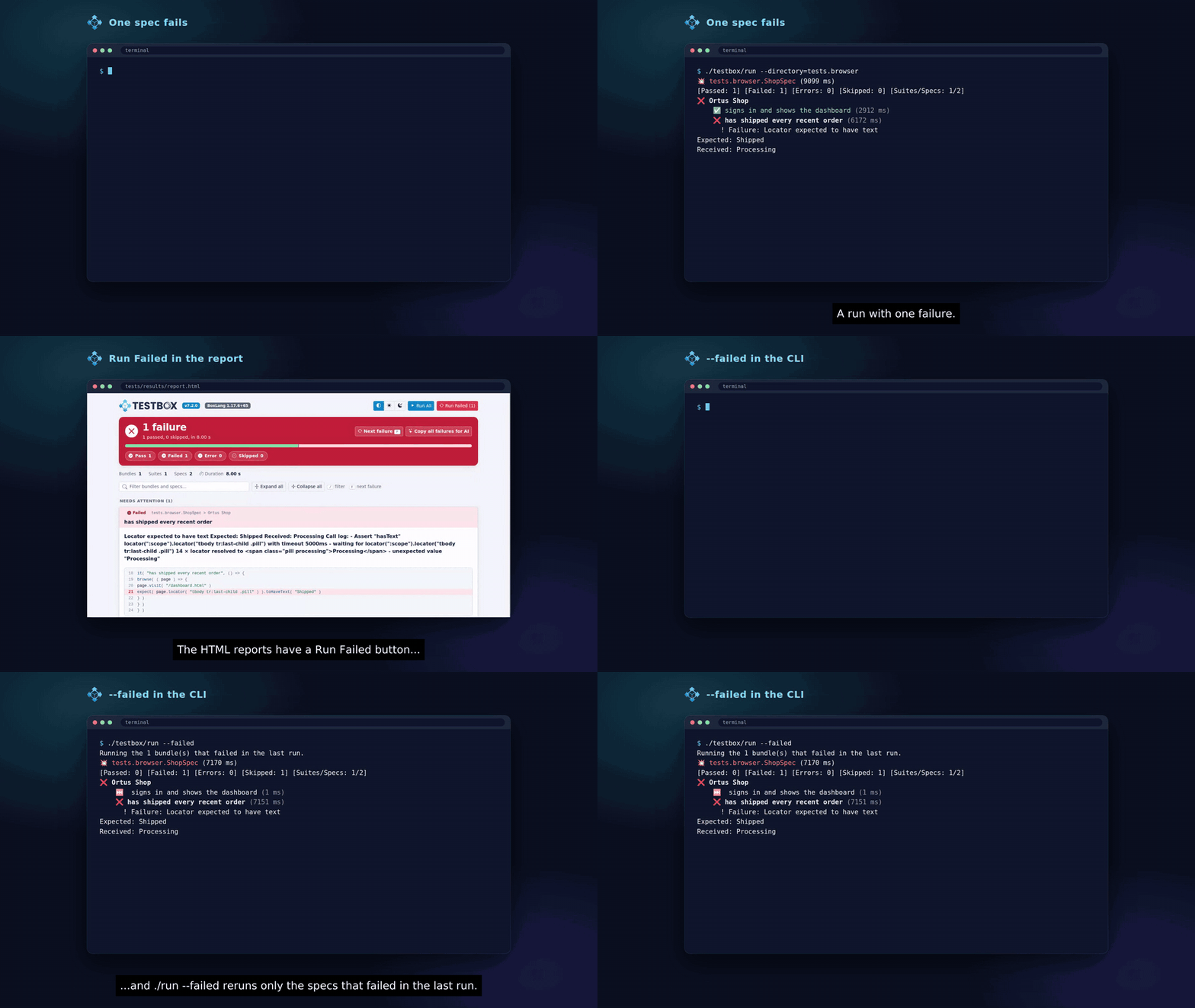
Run Failed in the report and --failed in the CLI
Every run of the BoxLang runner writes a `.testbox-failed.json` file to the report path (`--reportpath`, `tests/results` by default) with the bundles and spec ids that failed or errored:
```json
{ "bundles" : [ "tests.specs.LoginSpec" ], "specs" : [ "spec id", "spec id" ], "bundleErrors" : [ "tests.specs.CartSpec" ] }
```
`--failed` reads that file and runs only those bundles and specs:
```bash
# Full run: 3 specs fail
./testbox/run --directory=tests.specs
# Fix the code, then rerun just the 3 failures
./testbox/run --failed
```
* A bundle that failed outside of a spec, for example in `beforeAll()` or `afterAll()`, is broken, not flaky: it goes to `bundleErrors` and is **not** rerun. `--failed` lists those bundles so you can fix them and run them directly. The other failed bundles still rerun only their failed specs.
* When everything passed, every array is empty. `--failed` then prints `No failed tests recorded in [...], nothing to run.` and runs nothing. The same happens when the file is missing.
* The rerun writes the file again, so repeat `--failed` until it has nothing left to run.
* Use the same `--reportpath` for the full run and the rerun.
Combine it with [retries](/browser-testing/retries.md) for a forgiving rerun: `./testbox/run --failed --retries=1`.
### Run Failed in the HTML reports
The web runners keep no state, so they need no file. When something failed, the Simple, Min, Dot and Doc reports show a **Run Failed (N)** button next to **Run All**. Its link is built from the report on screen: `?testBundles=...&testSpecs=...` with the failed bundles and spec ids. Click it, fix, click it again. When the spec ids would make the link too long, it reruns the failed bundles whole. Bundles that failed outside of a spec are left out, like with `--failed`.
### From code
Both use `TestResult.getFailedTargets()`, available on every engine:
```js
var results = new testbox.system.TestBox( directory = "tests.specs" ).runRaw()
var failed = results.getFailedTargets()
// { bundles : [ "tests.specs.LoginSpec" ], specs : [ "spec id" ], bundleErrors : [] }
new testbox.system.TestBox( bundles = failed.bundles ).runRaw( testBundles = failed.bundles, testSpecs = failed.specs )
```
## Debugging a Failing Browser Spec
* Run the bundle with a visible browser: annotate the bundle with `@browserProfile( "debug" )`, or run with `BX_PLAYWRIGHT_PROFILE=debug` when the bundle has no `browserProfile`. The `debug` profile is headed, slowed down and records every artifact.
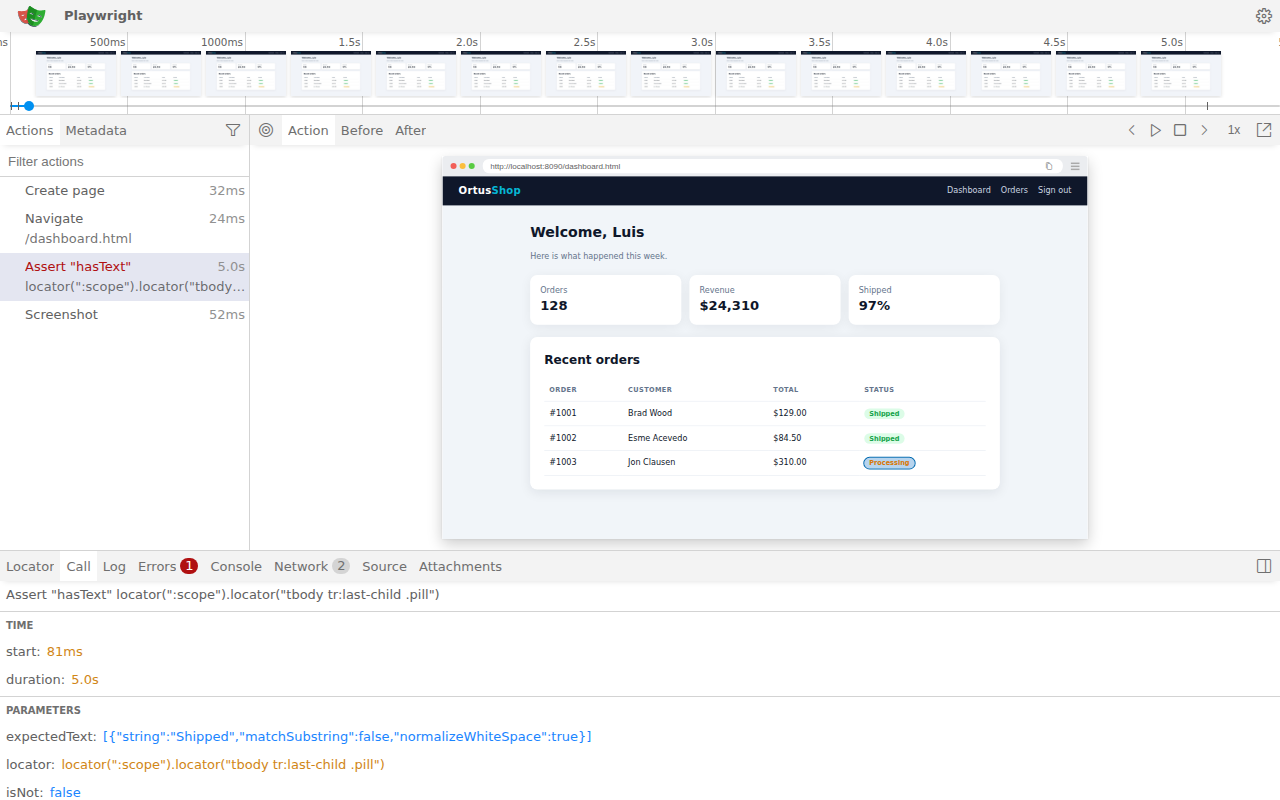
* Open the trace a failure [attached](/browser-testing/attachments.md) with `bxplaywright show-trace path/to/trace.zip`. It shows every action, the page before and after it, the console and the network.
* Record the steps of a new spec as BoxLang code with `bxplaywright codegen http://localhost:8080`.
Debugging a failure in the Playwright trace viewer
More in the [bx-playwright testing guide](https://bxplaywright.boxlang.io/testing/).
## Continuous Integration
A CI run needs the bx-playwright module, a browser and its system libraries, your application running, and somewhere to keep the screenshots and traces of failed specs:
* Install the browser with `bxplaywright install chromium --with-deps` (the `--with-deps` flag installs the system libraries on Linux).
* Use the `ci` profile, through `BX_PLAYWRIGHT_PROFILE=ci` or a `@browserProfile( "ci" )` annotation: headless, with a screenshot, trace and videos kept for every failed context.
* Cache `~/.boxlang/playwright` (driver, Node.js and browsers) between runs.
* Start the application with `--web-server`.
* Upload `tests/results` and the artifacts when the job fails.
### GitHub Actions
A complete workflow: it installs BoxLang with bx-playwright, installs TestBox with CommandBox, caches the browsers, runs the tests against the BoxLang MiniServer with one retry, and uploads the reports, screenshots, traces and videos of failed tests.
{% code title=".github/workflows/browser-tests.yml" %}
```yaml
name: Browser Tests
on: [ push, pull_request ]
jobs:
browser-tests:
runs-on: ubuntu-latest
steps:
- uses: actions/checkout@v4
- uses: actions/setup-java@v4
with:
distribution: temurin
java-version: "21"
- uses: ortus-boxlang/setup-boxlang@main
with:
version: latest
modules: bx-playwright
# Installs TestBox and your other dependencies from box.json
- uses: Ortus-Solutions/setup-commandbox@main
- name: Install dependencies
run: box install
# Driver, Node.js and browsers: one download per bx-playwright version
- name: Read the bx-playwright version
id: pw
run: echo "version=$( jq -r .version ~/.boxlang/modules/bx-playwright/box.json )" >> "$GITHUB_OUTPUT"
- uses: actions/cache@v4
with:
path: ~/.boxlang/playwright
key: playwright-${{ runner.os }}-${{ steps.pw.outputs.version }}
# --with-deps installs the system libraries, which are not cached
- name: Install Chromium
run: |
export PATH="$HOME/.boxlang/bin:$PATH"
bxplaywright install chromium --with-deps
bxplaywright doctor
- name: Run browser tests
env:
BX_PLAYWRIGHT_PROFILE: ci
run: |
export PATH="$HOME/.boxlang/bin:$PATH"
./testbox/run --directory=tests.specs \
--web-server="boxlang-miniserver --port 8080" \
--web-server-url=http://localhost:8080 \
--retries=1
- name: Upload reports and failure artifacts
if: failure()
uses: actions/upload-artifact@v4
with:
name: browser-test-results
path: |
tests/results
~/.boxlang/playwright/artifacts
if-no-files-found: ignore
```
{% endcode %}
Adapt the run step to your project: point `--directory` at your specs, and replace the MiniServer command with whatever starts your application. Artifacts go to `~/.boxlang/playwright/artifacts` unless you set the bx-playwright `artifacts.directory` setting. Download the `browser-test-results` artifact from the failed run and open a trace with `bxplaywright show-trace trace.zip`.
### Jenkins and GitLab
Run with `--reporter=junit` and publish `tests/results` as a JUnit report. Each test case lists its attachments in `` as `[[ATTACHMENT|path]]` lines, which the Jenkins JUnit Attachments plugin and GitLab test reports pick up. See [Attachments in Reports](/browser-testing/attachments.md#attachments-in-reports).
See [Continuous Integration](/digging-deeper/ci.md) for more CI setups.
---
# Agent Instructions
This documentation is published with GitBook. GitBook is the documentation platform designed so that both humans and AI agents can read, navigate, and reason over technical content effectively. Learn more at gitbook.com.
## Querying This Documentation
If you need additional information that is not directly available in this page, you can query the documentation by asking a question.
Perform an HTTP GET request on the following URL with the `ask` and `goal` query parameters:
```
GET https://testbox.ortusbooks.com/browser-testing/running-browser-tests.md?ask=&goal=
```
`ask` is the immediate question: it should be specific, self-contained, and written in natural language.
`goal` is what the user is ultimately trying to achieve, the reason they need the answer. Sharing it helps GitBook give you a better, more relevant answer. A goal is most helpful when it describes the outcome the user wants rather than restating the question. For example, with `ask=how do I create an API token`, a goal like `automate deployments from our CI pipeline` lets GitBook tailor the answer to that use case.
The response will contain a direct answer to the question and relevant excerpts and sources from the documentation.
Use this mechanism when the answer is not explicitly present in the current page, you need clarification or additional context, or you want to retrieve related documentation sections.