> For the complete documentation index, see [llms.txt](https://testbox.ortusbooks.com/llms.txt). Markdown versions of documentation pages are available by appending `.md` to page URLs; this page is available as [Markdown](https://testbox.ortusbooks.com/digging-deeper/dry-run.md).
# Dry Run & Spec Discovery
Discover your test specs and suites without executing any test code — explore what would run before it runs.
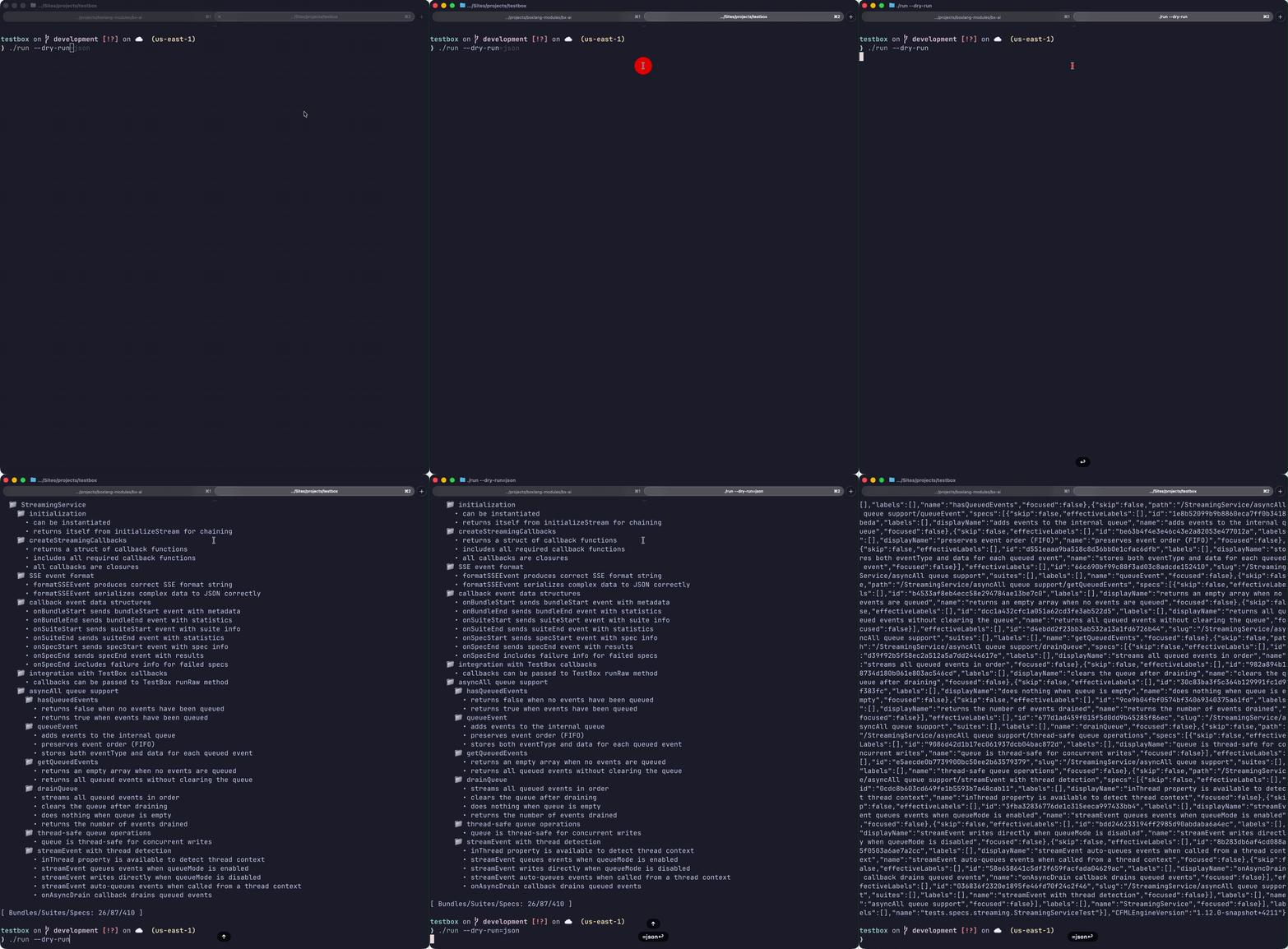
TestBox 7 adds a **Dry Run** mode that traverses all your test bundles, discovers every `describe()` suite and `it()` spec (or xUnit test method), and reports what *would* run — without executing a single line of test code. Use it to:
* Verify your test structure before a long CI run
* Get an exact count of specs by label, tag, or directory
* Preview filter results (`--labels`, `--bundles`, etc.) without the overhead of actually running tests
* Quickly audit suite naming and nesting
Dry-run output showing discovered suites and specs without executing them
***
## Web Runner — `url.dryRun`
The standard `runner.bxm` web runner also supports dry run via a URL parameter:
```
http://localhost/tests/runner.bxm?dryRun=true
http://localhost/tests/runner.bxm?dryRun=true&directory=tests.specs.unit
http://localhost/tests/runner.bxm?dryRun=true&labels=integration
```
When `dryRun=true` the runner bypasses the `StreamingRunner` path and passes the flag through to the HTML runner, returning the spec discovery tree in the browser instead of executing tests.
{% hint style="info" %}
All the same filter parameters (`directory`, `bundles`, `labels`, `excludes`, `testSuites`, `testSpecs`) work alongside `dryRun=true` in the web runner, just as they do in the CLI.
{% endhint %}
***
## BoxLang CLI — `--dry-run`
Add the `--dry-run` flag to any `./testbox/run` invocation:
```bash
# Console output (default)
./testbox/run --dry-run
# Combine with directory/label filters
./testbox/run --directory=tests.specs.unit --dry-run
./testbox/run --labels=integration --dry-run
# Output raw JSON instead
./testbox/run --dry-run=json
```
The console output groups specs under their parent suites, colour-codes them by type, and prints a summary count at the end.
### JSON Dry-Run Output
Pass `--dry-run=json` to receive a machine-readable structure:
```bash
./testbox/run --dry-run=json
./testbox/run --bundles=tests.specs.MySpec --dry-run=json | jq '.totalSpecs'
```
The JSON document shape:
```json
{
"totalBundles": 3,
"totalSuites": 12,
"totalSpecs": 47,
"bundles": [
{
"bundle": "tests.specs.MySpec",
"suites": [
{
"name": "My Feature",
"specs": ["it should do X", "it should do Y"],
"suites": []
}
]
}
]
}
```
***
## Programmatic Dry Run — `tb.dryRun()`
You can also trigger a dry run from CFML or BoxLang code via the `TestBox` instance:
### BoxLang
```javascript
var tb = new testbox.system.TestBox( bundles = "tests.specs" )
var results = tb.dryRun()
writeDump( var = results, label = "Dry-Run Results" )
```
### CFML
```javascript
var tb = new testbox.system.TestBox( bundles = "tests.specs" );
var results = tb.dryRun();
writeDump( var = results, label = "Dry-Run Results" );
```
### Programmatic JSON Output
```javascript
var tb = new testbox.system.TestBox( bundles = "tests.specs" )
var results = tb.dryRun()
writeOutput( serializeJSON( results ) )
```
***
## Filtering Respected
Dry run honours **all the same filters** as a normal test run:
| Option | Dry-Run Behaviour |
| ------------ | ---------------------------------------------------- |
| `bundles` | Limits discovery to specified bundles |
| `directory` | Limits discovery to bundles in the given directory |
| `labels` | Only specs/suites matching the label(s) are included |
| `excludes` | Labels to exclude from discovery |
| `testSuites` | Limits to matching suite names |
| `testSpecs` | Limits to matching spec names |
This means you can validate any filter combination before committing a `testbox run`.
***
## Use Cases
### Pre-flight Check
```bash
# How many specs exist in the integration suite?
./testbox/run --labels=integration --dry-run
```
### CI Matrix Planning
```bash
# Output JSON and parse it with jq
./testbox/run --dry-run=json | jq '.totalSpecs'
```
### Structure Audit
```bash
# Check all bundles at once
./testbox/run --directory=tests --dry-run
```
{% hint style="success" %}
Dry run is a zero-risk way to validate that your TestBox configuration, filter arguments, and bundle structure are correct before a real test run with side effects.
{% endhint %}
---
# Agent Instructions
This documentation is published with GitBook. GitBook is the documentation platform designed so that both humans and AI agents can read, navigate, and reason over technical content effectively. Learn more at gitbook.com.
## Querying This Documentation
If you need additional information that is not directly available in this page, you can query the documentation by asking a question.
Perform an HTTP GET request on the following URL with the `ask` and `goal` query parameters:
```
GET https://testbox.ortusbooks.com/digging-deeper/dry-run.md?ask=&goal=
```
`ask` is the immediate question: it should be specific, self-contained, and written in natural language.
`goal` is what the user is ultimately trying to achieve, the reason they need the answer. Sharing it helps GitBook give you a better, more relevant answer. A goal is most helpful when it describes the outcome the user wants rather than restating the question. For example, with `ask=how do I create an API token`, a goal like `automate deployments from our CI pipeline` lets GitBook tailor the answer to that use case.
The response will contain a direct answer to the question and relevant excerpts and sources from the documentation.
Use this mechanism when the answer is not explicitly present in the current page, you need clarification or additional context, or you want to retrieve related documentation sections.