For the complete documentation index, see llms.txt. This page is also available as Markdown.

What's New With 7.2.0

Coming soon

TestBox 7.2.0 brings browser testing to TestBox. Built on the bx-playwright module, BoxLang specs can now drive a real browser, assert on pages with web-first matchers, and keep the screenshots, traces and videos of failures. Around it, TestBox gains features that every test suite benefits from, on every engine: spec attachments, retries, a Run Failed option, and BoxLang runner options to start your web server. The HTML reporters get a complete new look and an Ask AI assistant for every failure, and the new Agent reporter lets AI agents and automation read a test run with a minimal token cost.

This release is not out yet. The release date will be added here when it ships.

Highlights

  • Browser testing on BoxLang with bx-playwright, turned on by a @browser, @browserProfile or @baseURL class annotation.

  • Browser matchers such as toSee(), toHavePath() and toBeVisible() that wait until they pass.

  • Spec attachments with attach(), shown in the HTML, JSON, text and JUnit reports.

  • Spec retries per spec, per bundle or for the whole run.

  • Run only what failed with a Run Failed button, --failed and TestResult.getFailedTargets().

  • --web-server runner options that start your application for the run.

  • New HTML reporters with light and dark themes, inline screenshots and Ask AI on every failure.

  • Agent reporter, a token-efficient JSON reporter for AI agents and automation.


Browser Testing

Browser specs and the browser matchers require BoxLang and the bx-playwright module. Write browser specs as BoxLang classes (.bx) and keep them out of Lucee and Adobe runs, where the browser annotations do nothing. On BoxLang without bx-playwright, browse() skips the running spec with an install hint: bx-playwright is not installed: install-bx-module bx-playwright.

Turn browser support on with a class annotation, @browser, @browserProfile or @baseURL, on any spec whose class, or a class it extends, carries it. No special base class is needed. Then call browse(): every declared closure argument gets a fresh page in its own isolated browser context, and the bundle shares one browser that the runner closes after the bundle, even when an afterAll() throws.

@baseURL( "http://localhost:8080" )
@browserProfile( "ci" )
class extends="testbox.system.BaseSpec" {

    function run() {
        describe( "Login", () => {
            it( "signs in", () => {
                browse( ( page ) => {
                    page.visit( "/login" )
                        .fill( "Email", "luis@ortus.com" )
                        .fill( "Password", "secret" )
                        .click( "Sign in" )
                    expect( page ).toHavePath( "/dashboard" )
                    expect( page ).toSee( "Welcome" )
                } )
            } )
        } )
    }

}
  • @browser, @browserProfile and @baseURL class annotations turn browser support on, and are inherited from parent classes: put @browser on your project base spec and its children can browse, and @browser( false ) opts a child out. It works for BDD and xUnit bundles on any base class, such as testbox.system.BaseSpec or a ColdBox BaseTestCase.

  • The runner mixes browse(), browserAvailable(), ensureBrowserInstalled(), getBrowserSupport() and closeBrowser() into the spec, adds this.playwright() and registers the browser matchers. Public methods your spec declares itself are kept; a private method with the same name is replaced.

  • testbox.system.BrowserSpec is an optional base class that carries @browser.

  • The browser of the bundle profile is installed on first use, unless the profile uses a branded channel such as chrome or msedge (it needs network access, and Linux needs the system libraries from bxPlaywright install chromium --with-deps). Use @browserAutoInstall( false ) to require a pre-installed browser, or ensureBrowserInstalled() to install it yourself. TestBox needs a bx-playwright version that provides playwrightEnsureBrowser(), the first stable release or later.

  • browse( callback, options ) with one page per declared argument, for multi-user flows.

  • this.playwright() for the bundle's bx-playwright manager, and browserAvailable() for skip constraints.

  • The logic lives in testbox.system.browser.BrowserSupport, usable from any BoxLang code.

Read the Browser Testing guide.

Browser Matchers

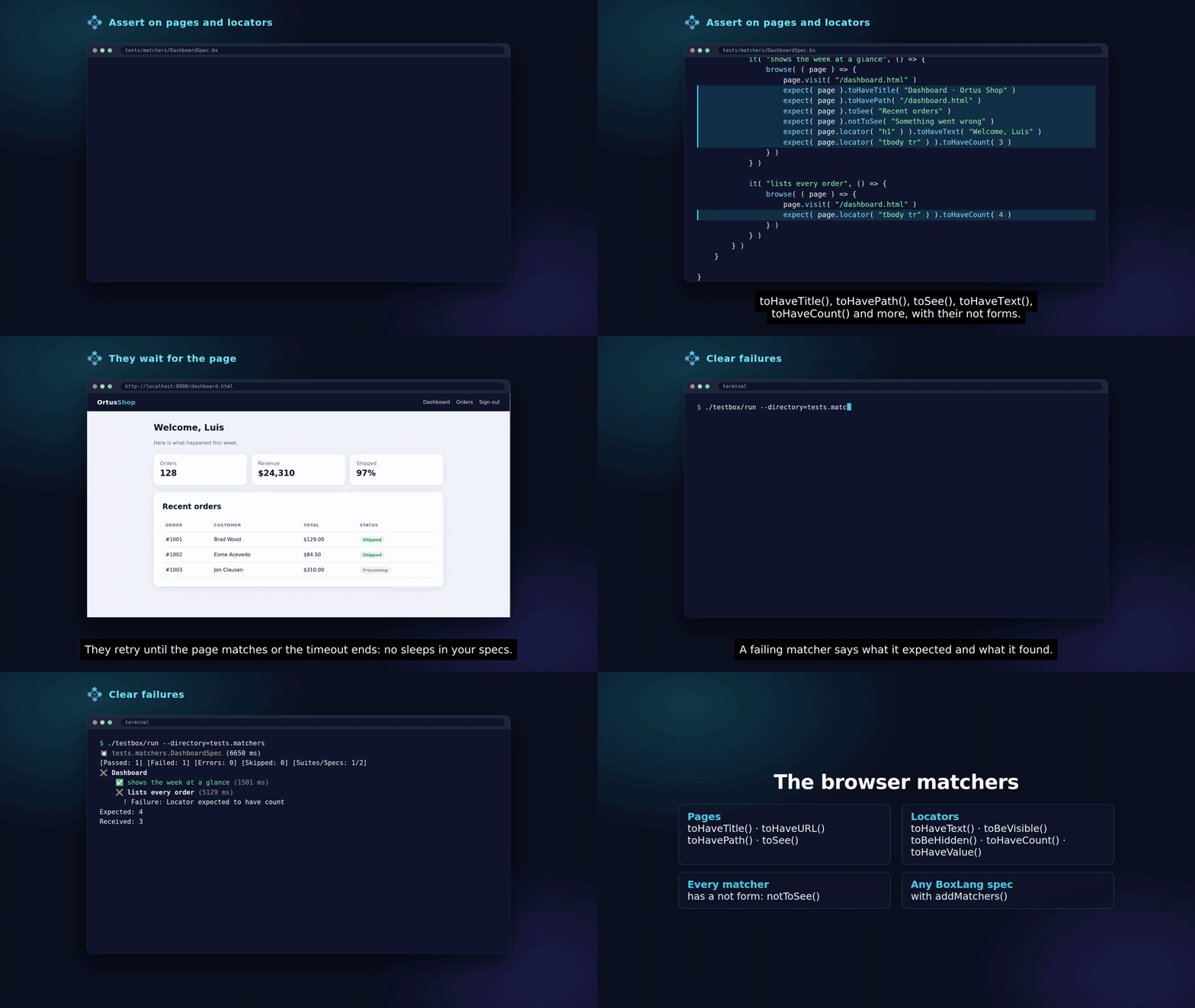
Nine web-first matchers for bx-playwright pages and locators, each with its not form. They retry until they pass or the assertion timeout expires, and fail with Playwright's expected, received and call log message.

Browser bundles register them for you; any other BoxLang spec can use addMatchers( new testbox.system.browser.BrowserMatchers() ). See Browser Matchers.

Spec Attachments: attach()

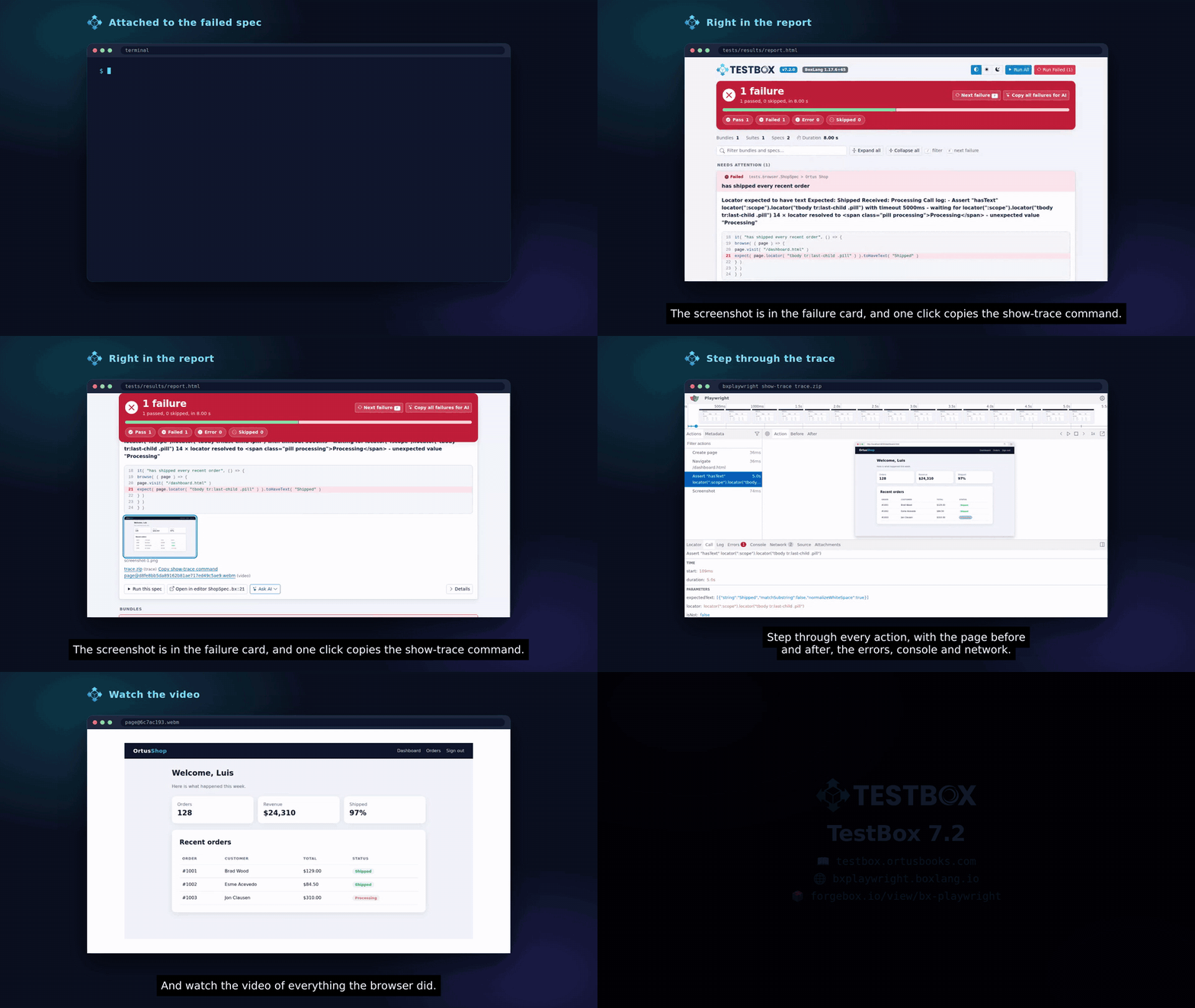
Every spec can attach files to its result, on every engine: attach( path, type = "file", name = "" ). A failed browse() attaches the screenshots, trace and videos bx-playwright kept.

Attachments land in the new attachments array of the spec stats. The JSON report includes them, the HTML reports show screenshots inline as thumbnails that open full size and link the other files, the text, console and stream outputs list them under failed specs, and the JUnit and ANT JUnit reports add one [[ATTACHMENT|path]] line per file in <system-out>, the format the Jenkins JUnit Attachments plugin and GitLab understand. See Attachments.

Spec Retries

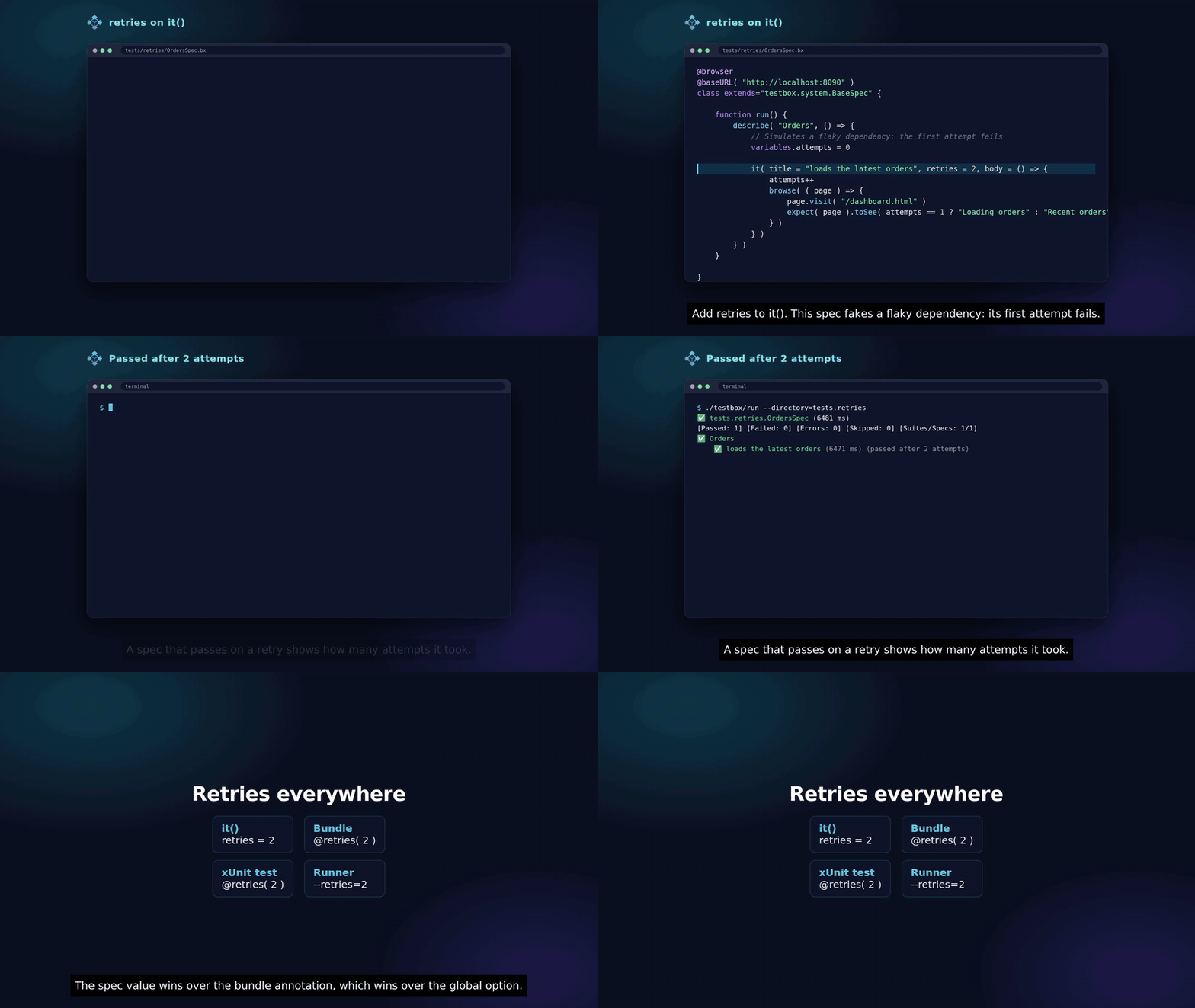
Rerun a failing or erroring spec, with its beforeEach() and afterEach() (or setup() and teardown()), up to N more times, on every engine:

  • A retries argument on it(), fit() and xit(), a retries bundle annotation, a retries method annotation for xUnit tests, and a global retries runner option (--retries=N on the BoxLang runner).

  • The spec value wins over the bundle annotation, which wins over the global option. Skipped specs are never retried.

  • The new attempts spec stat counts the runs, and reporters show (passed after 2 attempts).

See Retries.

Run Only What Failed

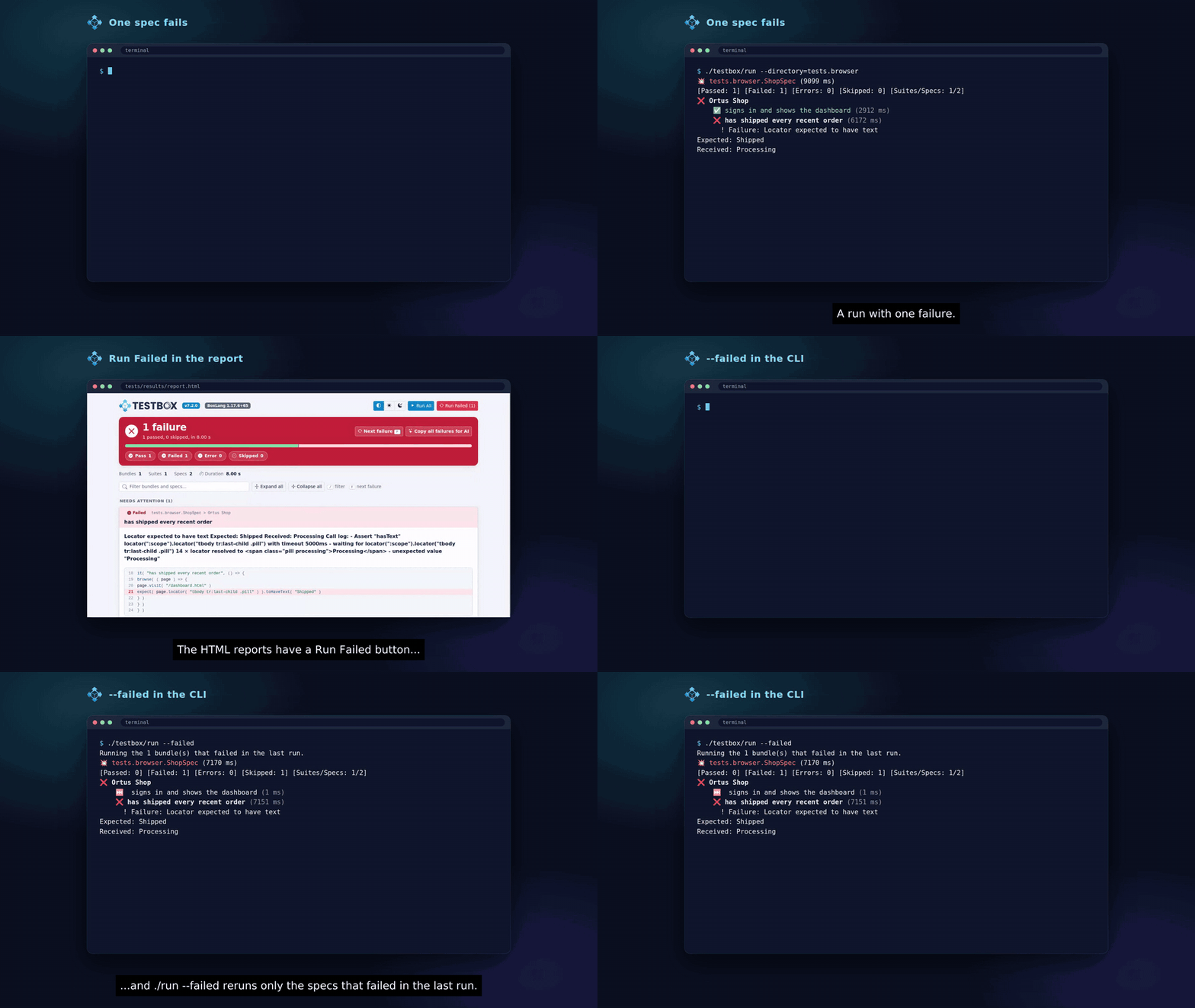
  • HTML reports: the Simple, Min, Dot and Doc reports show a Run Failed (N) button next to Run All when something failed. The link is built from the report, so the web runners keep no state.

  • BoxLang runner: every run writes {reportpath}/.testbox-failed.json with the bundles and spec ids that failed or errored, and ./testbox/run --failed reruns only those.

  • From code: TestResult.getFailedTargets() returns { bundles, specs, bundleErrors } on every engine.

Bundles that failed outside of a spec (beforeAll(), afterAll()) go to bundleErrors: they are listed, not rerun. When the file is missing or lists nothing, --failed prints a message and runs nothing. See Rerun What Failed.

BoxLang Runner: --web-server

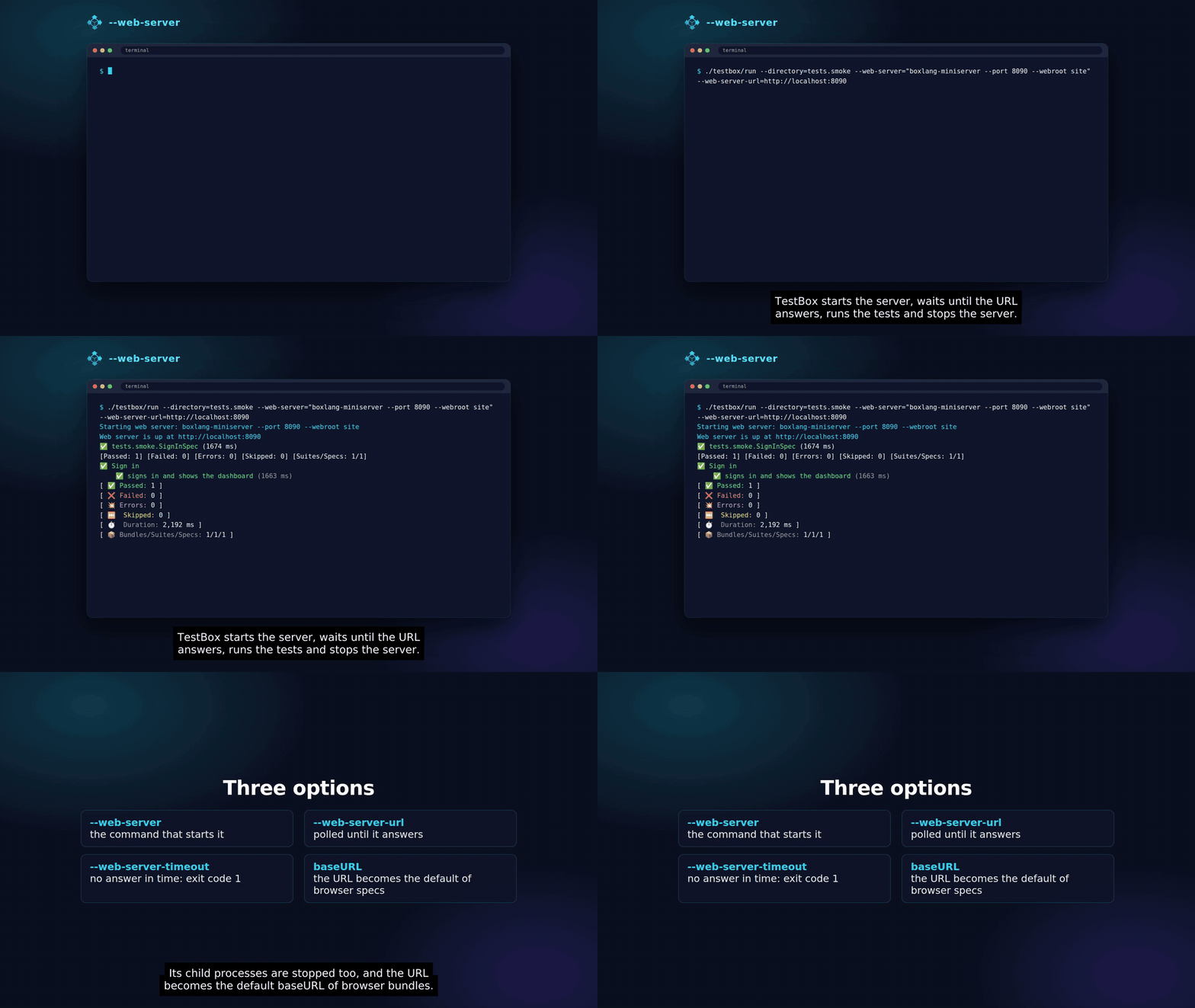
Start your application before the tests, wait until it answers, and stop it with its child processes afterwards:

The runner exits with code 1 when the server does not answer in time. The URL becomes the default baseURL of browser bundles. See Running Browser Tests.


A New Look For The HTML Reporters

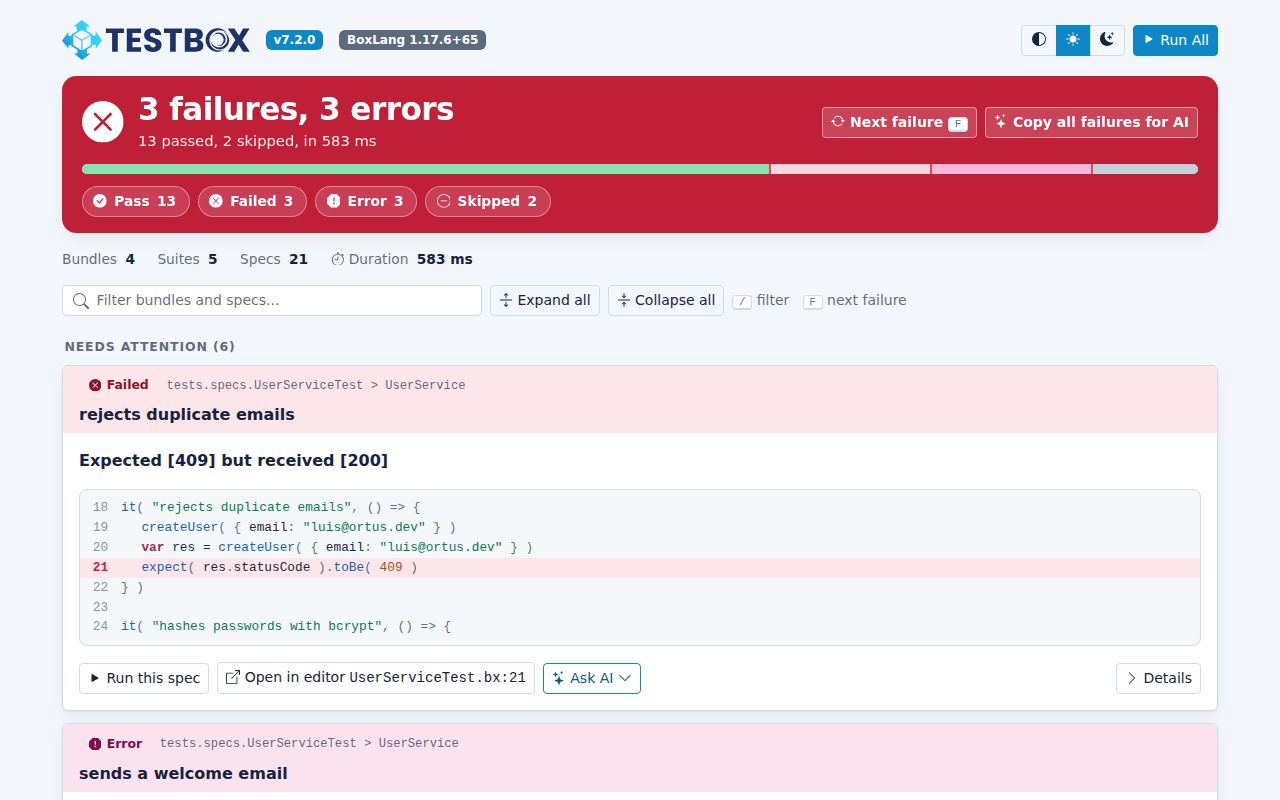
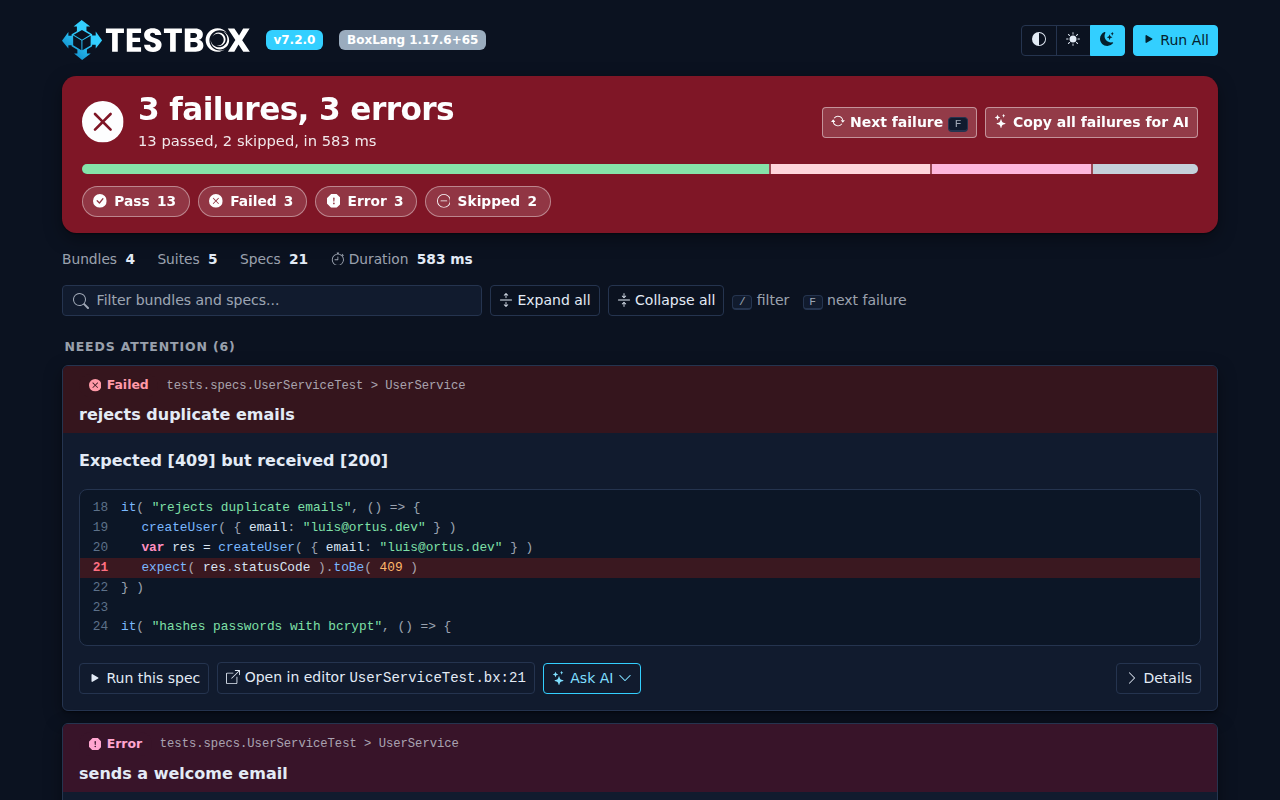
The Simple, Min, Dot and Doc reporters have been rebuilt and made reactive thanks to AlpineJS, with light and dark themes on the TestBox palette and the new TestBox logos. They keep every feature they had, and they are still fully inlined, so reports run airgapped. A page also went from about 1.4 MB to about 0.45 MB when fully loaded.

The Simple reporter in light mode
Simple, light mode
The Simple reporter in dark mode
Simple, dark mode

At A Glance

  • The verdict first. A green or red banner with the totals, a proportion bar and status filters, so a failing run can not be missed. A bundle that could not run gets its own alert above it.

  • Light, dark and system themes, applied before the page paints and remembered in your browser.

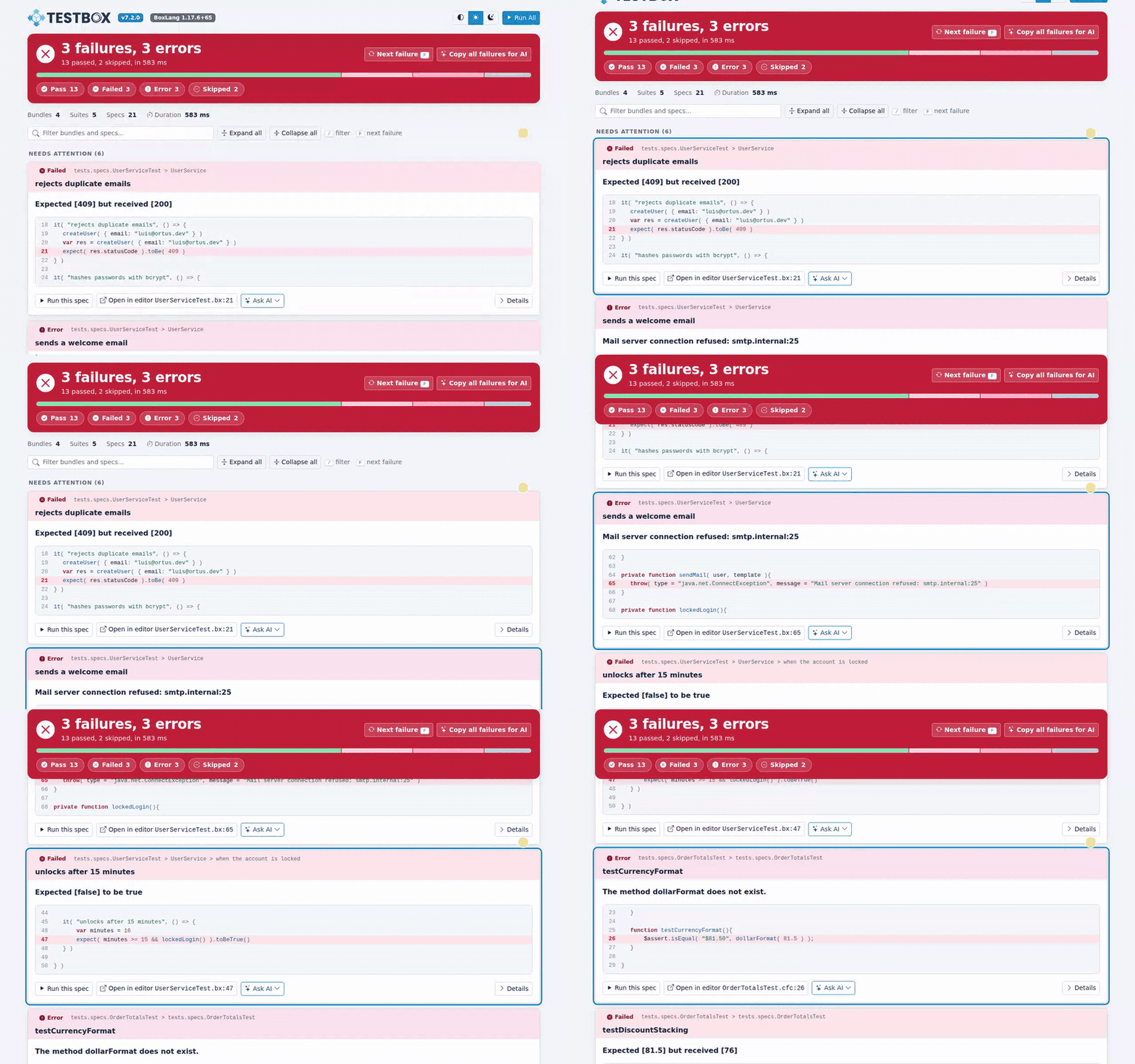
  • Keyboard navigation. Press F to jump to the next failure and / to search.

  • Filters everywhere. Filter the whole report or a single bundle by status, and search by name.

  • Highlighted code for BoxLang and CFML, with the failing line marked.

  • Run links on every bundle, suite and spec. They are plain links, so a refresh runs them again.

  • Run All and Run Failed. When something failed, a Run Failed (N) button reruns only those specs. The link is built from the report, so the web runner keeps no state. See Run Only What Failed.

  • Dot opens a drawer with the details, the code and Ask AI, instead of an alert(). Doc has a bundle navigation.

  • Responsive, so a CI artifact is readable on a phone.

Pressing F to jump between failures
Press F to jump from failure to failure
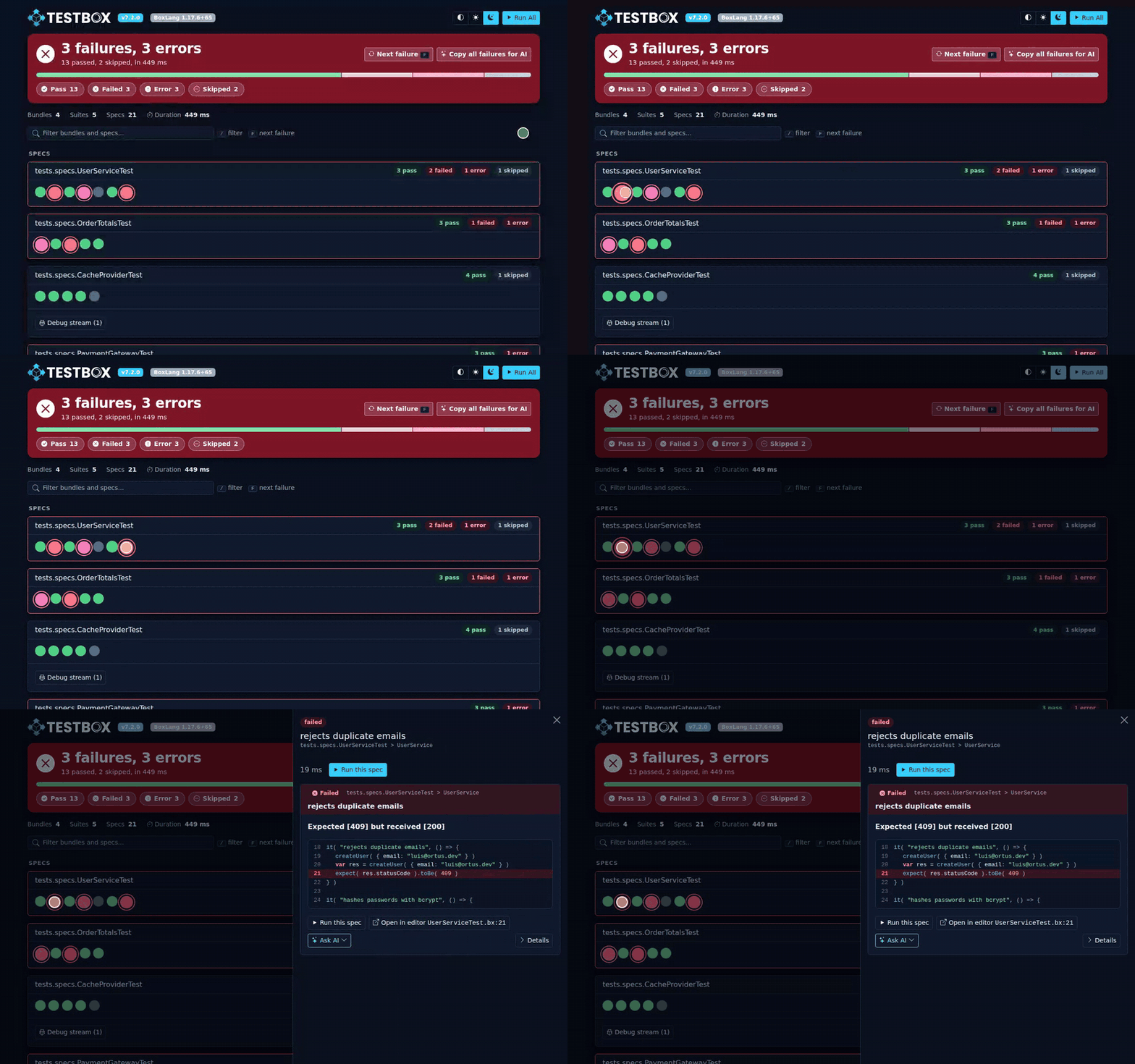
The Dot reporter opening a drawer
Dot opens the details in a drawer

Screenshots In The Report

Image attachments, such as failure screenshots, show as thumbnails that open full size. They are embedded in the page, so they work over http and in saved reports. Images up to the new inlineImageMaxKB reporter option (default 2048, 0 turns it off) are embedded, larger ones stay links. A trace attachment offers a Copy show-trace command button.

See Screenshots in the HTML Reports.

Ask AI

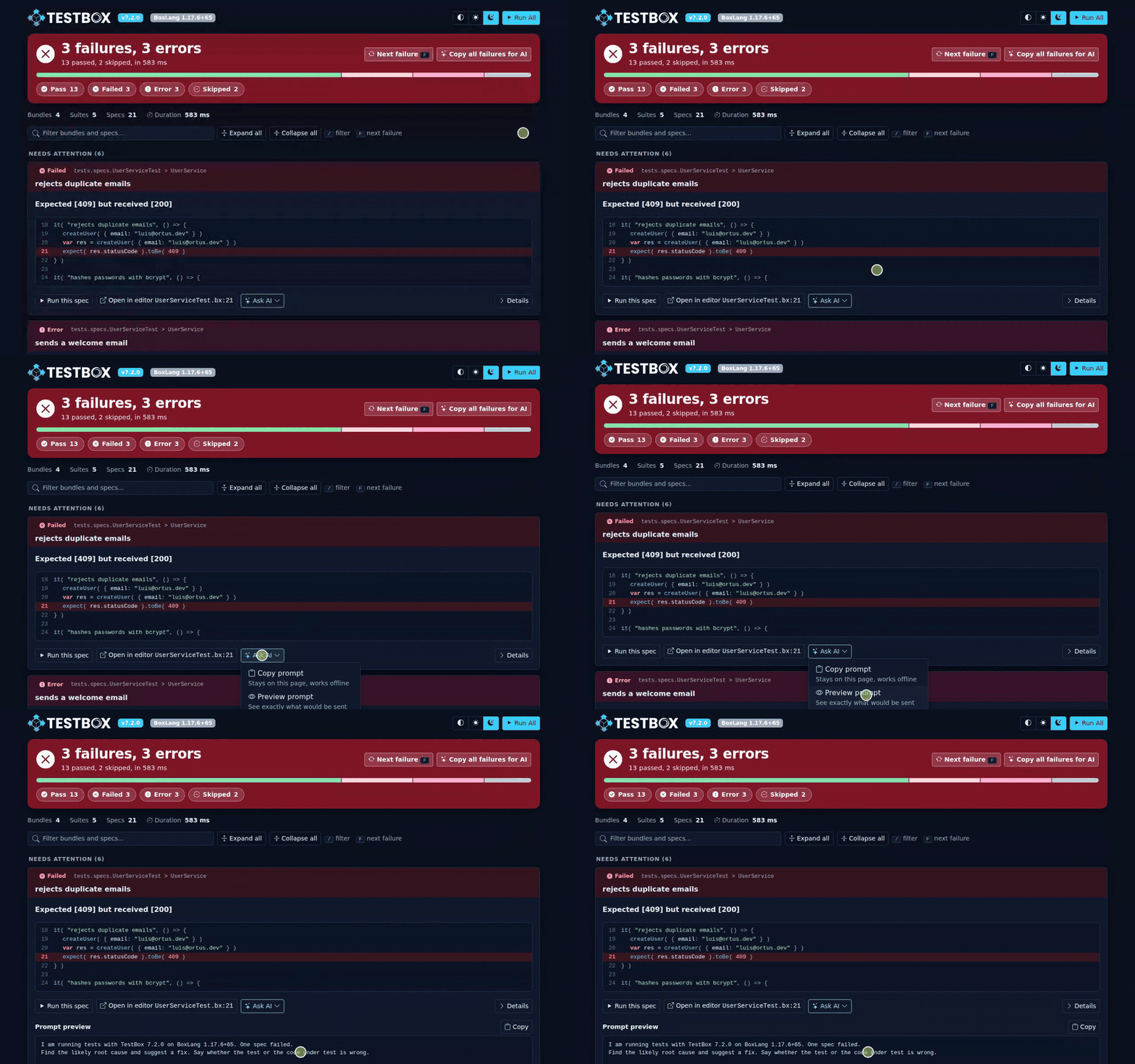
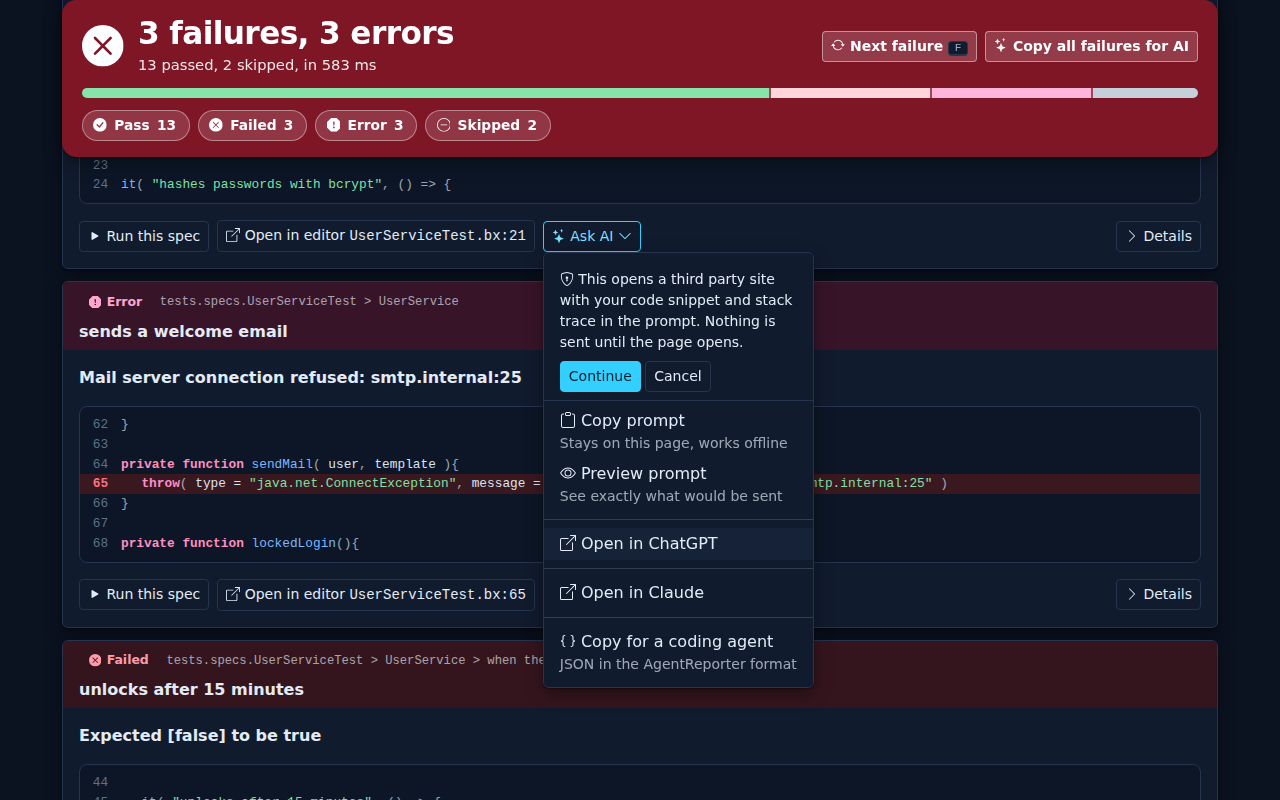
Every failure and error has an Ask AI menu. It builds a prompt with the spec, the message, the code around the failing line, the first stack frames and the command that runs only that spec again. You can copy it, preview it, open it in ChatGPT or Claude, or copy the failure as JSON for a coding agent. Copy all failures for AI builds one prompt for the whole run.

Opening the Ask AI menu and previewing the prompt
Ask AI menu and prompt preview

Ask AI is on by default. Nothing leaves the page until you click a provider, and the first time you do, the page tells you what will happen and waits for your confirmation. Use the aiAssist, aiProviders, aiContextLines, aiStackFrames and aiPrompt reporter options to configure it, or ?aiAssist=false to switch it off for a run. See Ask AI options.

The first-use notice

Reports From Code

The urlParams reporter option sets request params such as editor and aiAssist when you produce a report from code and there is no url scope, for example with the BoxLang CLI:

Upgrade Notes

The report templates now keep only markup. Their logic lives in system/reports/ReportHelper.cfc and BaseHTMLReporter.cfc. The reporters share one base class, BaseHTMLReporter. The inlined front-end libraries are rebuilt from build/vendor with box run-script assets:update.

Everything about the new reporters is documented in HTML Reporters.


Agent Reporter

The new Agent reporter returns a single minified JSON line with the totals and only the specs that failed or errored. A passing run is a few dozen tokens, where the JSON reporter returns the full result set.

You can control the amount of detail with the detail, maxFailures, maxMessageLength, includeStack, stackDepth, includeSkipped and includeDebug options. See the full reference in Reporters.

Changes

Playwright Assertion Failures Are Failures

xUnit Failure Detail

xUnit failures now also record the failure detail in the spec stats, as BDD failures already did.

Fixes

  • Bundle error badge. The bundle badge of the HTML reporters showed a negative error count (-1 error) when a bundle threw outside a spec, for example in beforeAll(). It now shows none.

  • run script quoting. The run launcher script now quotes its arguments, so runner options with spaces, such as a --web-server command, reach the BoxLang runner intact.

  • Specs that do not extend BaseSpec. TestBox mixes testbox.system.BaseSpec into a spec that does not extend it. On BoxLang those specs errored: the mixed in BaseSpec missed its private state, three of its methods declared a BaseSpec return type, and expect() resolved Expectation relative to the spec. They run again.

  • JUnit reports without bx-esapi. The JUnit and ANTJunit reporters failed on BoxLang when the bx-esapi module was not installed, because they encode attributes with encodeForXMLAttribute(). They now fall back to xmlFormat(), also on Adobe with full null support.

Release Notes

New Features

#
Title

TESTBOX-469

New AgentReporter (reporter=agent): a token-efficient JSON reporter for AI agents, with the detail, maxFailures, maxMessageLength, includeStack, stackDepth, includeSkipped and includeDebug options

TESTBOX-470

Browser testing with bx-playwright: @browser, @browserProfile and @baseURL annotations, optional BrowserSpec, browse(), one browser per bundle closed by the runner, failure artifacts attached to the spec

TESTBOX-470

Browser matchers: toHaveTitle(), toHaveURL(), toHavePath(), toSee(), toHaveText(), toBeVisible(), toBeHidden(), toHaveCount() and toHaveValue(), with their not forms

TESTBOX-470

attach( path, type, name ) and the attachments spec stat, in the JSON, HTML, text, console, stream, JUnit and ANT JUnit reports

TESTBOX-470

Spec retries: retries on it(), fit() and xit(), bundle and xUnit method annotations, global retries option and --retries=N, with the attempts spec stat

TESTBOX-470

Run only what failed: TestResult.getFailedTargets(), the Run Failed button and the BoxLang runner --failed option

TESTBOX-470

BoxLang runner --web-server, --web-server-url and --web-server-timeout options

TESTBOX-471

Ask AI on failures, with the aiAssist, aiProviders, aiContextLines, aiStackFrames and aiPrompt reporter options

TESTBOX-471

urlParams reporter option for reports produced from code

TESTBOX-471

Inline image attachments in the HTML reports and the inlineImageMaxKB reporter option

TESTBOX-471

build/vendor rebuilds the inlined front-end libraries with box run-script assets:update

Improvements

#
Title

TESTBOX-471

HTML reporters rebuilt on Bootstrap 5.3, Bootstrap Icons, Alpine and Prism, with light and dark themes, new logos and pages about a third of the size

TESTBOX-471

The verdict first: a sticky banner with counts, a proportion bar and status filters, and an alert for bundle exceptions

TESTBOX-471

Re-run links are plain links that carry only testBundles, testSuites or testSpecs

TESTBOX-471

Dot opens a drawer, Doc has a bundle navigation, and the status chips of Min and Dot filter

TESTBOX-471

Report templates keep only markup; logic moved to ReportHelper.cfc and BaseHTMLReporter.cfc

TESTBOX-470

Playwright.AssertionFailed counts as a spec failure, not an error

xUnit failures record the failure detail in the spec stats

Bugs

#
Title

TESTBOX-471

The bundle badge of the HTML reporters showed -1 error when a bundle threw outside a spec

The run script now quotes its arguments

The JUnit and ANTJunit reporters failed on BoxLang without bx-esapi

Specs that do not extend testbox.system.BaseSpec run again (#223)

Removed

#
Title

TESTBOX-471

The url.fullPage switch of the HTML reporters: a report is always a complete page

Last updated

Was this helpful?